
The Direct Answer
Copy UI when you need to ship fast and learn from proven patterns. Design from scratch when you have time, want to solve a unique problem, or need to build deeper design intuition. The real skill isn't choosing one or the other-it's knowing which approach serves your current goal, then executing it with intention.
Most developers without design training worry that copying is "cheating." It's not. It's a legitimate learning strategy used by professionals across the industry. The difference between learning through replication and mindless duplication comes down to one thing: understanding why the UI works the way it does.
The Real Question: Copy or Design From Scratch?
This isn't actually a binary choice. It's a spectrum.
On one end: you copy a button from a SaaS site and paste it into your project without thinking about why it works.
On the other end: you spend three weeks designing a button system from first principles, testing it with users, and iterating.
Most of the time, the answer is somewhere in the middle.
The question you should really be asking is: What's the fastest way to ship something that works, while still learning something valuable?
For self-taught developers and junior engineers, copying UI is often the answer. Not because it's the "right" way to design, but because it's the fastest way to build products while absorbing design patterns naturally.
Why Copying UI Gets a Bad Reputation
There's a persistent myth in design circles: copying UI is lazy, unoriginal, and will stunt your growth.
This comes from a real place. If you copy UI without understanding it, you'll never develop design intuition. You'll become a human copy-paste machine. That's a legitimate concern.
But the myth conflates two different things:
- Copying as learning (studying how others solved a problem)
- Copying as avoidance (not thinking at all)
One builds skills. The other doesn't.
The design community often emphasizes the second risk so heavily that it discourages the first approach entirely. This is a mistake, especially for developers who don't have formal design training and need to ship products.
The Truth About Learning Through Replication
Here's what actually happens when you copy UI intentionally:
You're reverse-engineering design decisions. You're asking: Why is this button this size? Why is the spacing 16px and not 12px? Why does this form have three columns instead of one?
When you ask these questions while copying, you're learning. When you don't ask them, you're just duplicating.
The difference is intention.
Intentional copying looks like this:
- Find a UI pattern you want to understand (a pricing table, a navigation bar, a form layout)
- Copy the HTML and CSS from a live site
- Study the structure: Why is it organized this way?
- Modify it: What happens if you change the spacing? The colors? The layout?
- Adapt it to your context: How would this work for your specific use case?
This is how professionals learn. Architects study buildings. Musicians learn by playing covers. Programmers learn by reading code.
Copying UI is the same thing. It's a legitimate learning strategy.
When Copying UI Actually Makes Sense
You should copy UI when:
- You're building a standard component (buttons, forms, cards, navigation)
- You need to ship quickly and can't afford weeks of design iteration
- You're learning design patterns and want to understand how others solved similar problems
- You're building an MVP and need to validate the product idea before investing in custom design
- You're working with AI tools like Cursor and want to accelerate component generation
- You're building a dashboard, admin panel, or internal tool where standard patterns are expected
- You don't have a designer on your team and need to move fast
In these situations, copying isn't a shortcut. It's the right tool for the job.
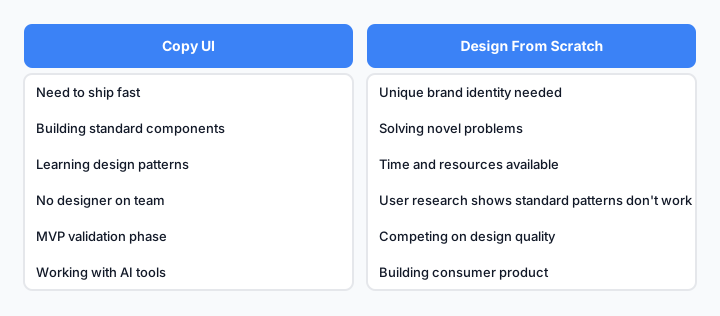
When to copy vs. design: a practical decision tree for developers.
When You Should Design From Scratch (Or Hire Help)
You should design from scratch when:
- Your product has a unique brand identity that standard patterns won't serve
- You're building something that solves a novel problem (no good reference exists)
- You have time and resources to iterate on design
- User research shows that standard patterns don't work for your specific audience
- You're building a consumer product where differentiation matters
- You want to develop deeper design skills and are willing to invest the time
If you're building a SaaS product that competes on design quality, or a consumer app where brand matters, copying standard UI will limit you. You'll end up looking like everyone else.
But here's the thing: even in these cases, you probably start by copying. You copy to understand the baseline. Then you iterate and customize from there.
Copy With Purpose: The Strategic Approach
The best developers don't choose between copying and designing. They do both, strategically.
Here's the framework:
Phase 1: Copy the baseline
Find a product in your space that solves a similar problem. Copy the HTML and CSS from key components. Understand why they made the choices they did.
Phase 2: Understand the constraints
Ask yourself: What problem was this UI solving? Who was the audience? What were the constraints (mobile vs. desktop, accessibility, performance)?
Phase 3: Adapt to your context
Now modify it. Change the colors to match your brand. Adjust the spacing. Reorganize the layout for your specific use case. Add or remove features based on what your users actually need.
Phase 4: Test and iterate
Ship it. Get feedback. Iterate. This is where real design happens.
This approach is faster than designing from scratch, but more intentional than mindless copying. It's how most successful products actually get built.
How to Copy UI Without Losing Your Voice
The fear is real: if you copy too much, your product will look generic.
It won't, if you do this right.
Here's how to copy without losing your identity:
1. Copy the structure, not the aesthetics
The layout, spacing, and information hierarchy are the valuable parts. The colors, typography, and visual style are where you inject your brand.
2. Copy patterns, not pixels
Don't copy exact dimensions. Understand the principle (e.g., "buttons have 16px padding") and apply it consistently across your product.
3. Copy selectively
Don't copy an entire page. Copy specific components or patterns. Mix and match from different sources. This naturally creates something unique.
4. Customize aggressively
Once you have the baseline, change everything that doesn't serve your specific users. Colors, spacing, typography, animations. Make it yours.
5. Document your decisions
As you customize, write down why you made each change. This builds design intuition and creates a reference for future work.
Common Mistakes Developers Make When Copying
Mistake 1: Copying without understanding
You grab code from a site and paste it into your project without reading it. This doesn't teach you anything and often breaks in your context.
Fix: Always read the code. Ask why each line exists. Modify it to understand how it works.
Mistake 2: Copying too literally
You copy exact pixel values, colors, and spacing from another site. This creates a clone, not an adaptation.
Fix: Copy the principle, not the pixels. Understand the ratio and spacing logic, then apply it to your design system.
Mistake 3: Copying from the wrong source
You copy UI from a site that solves a completely different problem. The patterns don't transfer.
Fix: Copy from products that solve similar problems for similar audiences. A SaaS dashboard is a better reference than a consumer app.
Mistake 4: Not adapting for your constraints
You copy a desktop layout and don't adapt it for mobile. Or you copy a pattern designed for a different audience.
Fix: Always ask: Does this work for my users? Do I need to adapt it for mobile, accessibility, or performance?
Mistake 5: Copying and never iterating
You ship the copied UI and never improve it based on user feedback.
Fix: Treat copied UI as a starting point, not a destination. Iterate based on how users actually interact with it.
Copying UI + AI Workflows: The Modern Advantage
This is where copying gets interesting.
If you copy UI and feed it to an AI tool like Cursor, you can generate variations, adapt it to different frameworks, and iterate much faster than designing from scratch.
The workflow looks like this:
- Find a UI pattern you like
- Copy the HTML and CSS
- Paste it into Cursor with a prompt like: "Adapt this button component for a dark theme and add loading states"
- The AI generates variations
- You pick the best one and customize further
This is neither pure copying nor pure design. It's a hybrid approach that combines the speed of copying with the customization of design.
For developers without design training, this is a game-changer. You get the benefits of copying (speed, proven patterns) without the limitations (generic output, lack of customization).
Building Your Own UI Library From Copied Patterns
Here's the long-term play:
Over time, as you copy and adapt UI patterns, you'll naturally build a personal library of components and patterns that work for your projects.
This library becomes your design system. It's built on proven patterns (copied from others) but customized for your specific needs (your brand, your users, your constraints).
This is how most design systems actually start. They don't emerge from pure design thinking. They emerge from copying, adapting, and iterating over time.
The developers who do this best:
- Copy intentionally (understanding why)
- Adapt aggressively (making it their own)
- Document thoroughly (so they can reuse it)
- Iterate constantly (based on user feedback)
After a few projects, you'll have a library of components that are uniquely yours. You'll stop copying from external sources and start copying from your own library.
That's when you know you've moved from "copying UI" to "building a design system."
The Bottom Line
Copy UI when it makes sense. Design from scratch when it doesn't. The real skill is knowing the difference and executing with intention.
For self-taught developers and junior engineers, copying is a legitimate and valuable learning strategy. It's not cheating. It's how professionals learn.
The key is to copy with purpose: understand why the UI works, adapt it to your context, and iterate based on feedback. Do that, and you'll build better products faster while developing real design intuition.
You don't need formal design training to ship great UI. You need intention, curiosity, and the willingness to learn from what others have built.
Start by copying. Then adapt. Then iterate. That's the path to becoming a developer who can ship beautiful, functional UI without a designer on the team.