
Quick Answer
You can copy HTML structure, CSS code, and design patterns from any website without permission. You cannot copy the exact visual design, branding, or proprietary code if it's protected by copyright. The legal line is: code and structure are fair game; the creative expression and brand identity are not. Using tools like Element Armory to extract code is legal, but you must understand what you're extracting and how you're using it.
The Legal Reality: Copyright vs Inspiration
When you copy UI from a live website, you're dealing with two separate legal concepts: copyright and design patterns.
Copyright protects the specific creative expression of a design-the exact arrangement of colors, typography, spacing, and visual hierarchy. It also protects the underlying code if it's original and substantial.
Design patterns and principles are not protected. A button with rounded corners, a card layout, or a navigation bar structure cannot be copyrighted. These are functional design solutions that exist across thousands of websites.
The confusion happens because developers often think "if I can see it, I can copy it." That's partially true, but the how and what matter legally.
According to copyright law in Australia, copyright automatically protects original creative works, including website designs and code. But this protection has limits, and understanding those limits is what separates legal copying from infringement.
What You Can Copy Without Permission
1. HTML Structure and Semantic Markup
The underlying HTML structure-divs, sections, lists, forms-is functional code, not creative expression. You can extract and reuse the semantic structure of any website.
Example: A pricing table with three columns and rows is a functional structure. Copying that structure is legal.
2. CSS Code and Styling Techniques
CSS is code. The specific syntax, property values, and techniques used to style elements are reusable. You can copy CSS from any website and adapt it to your own project.
What matters: You're copying the method, not claiming you invented it.
3. Design Patterns and Principles
Common UI patterns are not copyrightable:
- Navigation bar layouts
- Card-based designs
- Modal dialogs
- Form input styles
- Button states (hover, active, disabled)
- Grid layouts
- Sidebar patterns
These exist across thousands of websites because they solve real problems. Using them is not infringement.
4. Color Palettes and Typography Choices
A color palette (e.g., blue #2563EB, gray #6B7280) is not copyrightable. Neither is the choice to use a specific font family like Inter or Helvetica. These are tools, not creative works.
However: If a brand has trademarked a specific color combination (like Coca-Cola's red), that's different. But standard color choices are fair game.
5. Functional Code and Algorithms
JavaScript functions, utility classes, and algorithmic solutions are code. You can study, learn from, and adapt them. Open-source licenses exist precisely because code is meant to be shared and reused.
What You Cannot Copy (Even If It Looks Easy)
1. The Exact Visual Design
This is the biggest gray area. If you extract a website's design and reproduce it pixel-for-pixel in your own project, you're copying the creative expression. This is infringement.
The test: Would a reasonable person see your design and think it's a copy of the original? If yes, you've crossed the line.
2. Proprietary Code and Algorithms
If a website uses custom, non-obvious code that solves a specific problem in a unique way, that code may be protected. Copying it wholesale is risky.
Example: A custom animation library or a proprietary data processing algorithm.
3. Brand Identity and Visual Language
Logos, brand colors, typography systems, and the overall visual identity of a brand are protected. You cannot copy a brand's complete visual system and apply it to your own project.
Example: Copying Stripe's design language, color system, and component library for your own SaaS product is infringement.
4. Substantial Portions of Code
If you copy large sections of code from a website (not just techniques, but actual code blocks), you may be infringing. The threshold is "substantial"-meaning a significant portion of the original work.
5. Copyrighted Assets
Images, icons, illustrations, and other media are copyrighted. You cannot extract and reuse them without permission.
Fair Dealing: The Developer's Legal Gray Zone
Fair dealing is a legal doctrine that allows limited use of copyrighted material without permission. It applies to:
- Research and study: Copying code to learn how it works
- Criticism and review: Analyzing a design to understand its approach
- News reporting: Discussing a website's design in an article
- Parody: Creating a humorous version of a design
Fair dealing is not a free pass to copy anything. Courts consider:
- Purpose: Are you learning or copying for commercial gain?
- Amount: How much did you copy?
- Effect: Does your use harm the original creator's market?
For developers: Copying code to learn is fair dealing. Copying code to ship in production without modification is not.
UI Extraction Tools and Legal Responsibility
Tools like Element Armory, CSS Scan, and DivMagic are legal. They extract code from websites, which is legal. But using the tool doesn't make copying legal-it just makes extraction easier.
The responsibility is yours.
When you use an extraction tool:
- Understand what you're extracting. Are you copying structure, styles, or the entire design?
- Modify and adapt. Don't ship extracted code as-is. Change colors, spacing, typography, and layout.
- Document your sources. If you're learning from a design, acknowledge it.
- Check the website's terms. Some sites explicitly forbid scraping or copying.
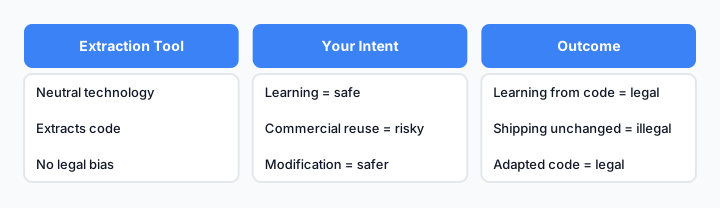
The legal responsibility chain: tools are neutral; your use determines legality.
How to Copy UI Ethically and Legally
Step 1: Extract the Structure, Not the Design
Use an extraction tool to grab HTML and CSS. This is the safe part.
Step 2: Modify the Visual Design
Change:
- Colors
- Typography
- Spacing and padding
- Border radius and shadows
- Layout proportions
Make it visually distinct from the original.
Step 3: Rewrite Substantial Code
If you copied JavaScript or complex CSS, rewrite it in your own style. Don't ship extracted code directly.
Step 4: Add Your Own Creative Elements
Introduce new components, interactions, or visual treatments that are uniquely yours.
Step 5: Document Your Process
If you're learning from a design, note it in your project documentation or comments. This shows good faith.
Real Examples: What's Safe and What Isn't
| Scenario | Legal? | Why |
|---|---|---|
| Copy a button's HTML structure and CSS | ✅ Yes | Code and structure are reusable |
| Copy a website's entire design and apply it to your product | ❌ No | You're copying creative expression |
| Extract a card component and modify colors/spacing | ✅ Yes | You've adapted it; it's no longer a copy |
| Copy a navigation bar layout from a competitor | ✅ Yes | Layout patterns are not copyrightable |
| Copy a brand's color palette and typography system | ❌ No | This is brand identity; it's protected |
| Study a website's CSS techniques and apply them differently | ✅ Yes | You're learning, not copying |
| Extract JavaScript and use it in your project unchanged | ❌ No | You're copying substantial code |
| Copy a form's input styling and adapt it | ✅ Yes | Input styles are functional, not creative |
When You Need Permission (And How to Get It)
You need permission if:
- You want to use the exact design. Contact the website owner and ask.
- You're copying substantial code. Check the license (MIT, GPL, etc.) or ask permission.
- You're using copyrighted assets. Images, icons, and illustrations require permission or licensing.
- The website has a terms of service that forbids copying. Respect it.
How to ask:
- Find the website's contact page or email.
- Be specific: "I'd like to use your [component/design] in my project. Can I have permission?"
- Offer attribution or a link back.
- Be prepared for "no."
Most indie developers and small companies will say yes if you ask. Large companies rarely grant permission, but it's worth asking.
Protecting Your Own UI From Being Copied
If you build UI that you want to protect:
- Add a copyright notice. Include
© 2026 Your Companyin your code comments. - Use a license. Add a LICENSE file to your repository (MIT, Apache, GPL, etc.).
- Monitor for copies. Use tools like Google Alerts to track mentions of your design.
- Document your creative process. Timestamps and version history prove you created it first.
- Consider a design system license. If you're selling a design system, use a commercial license.
Common Mistakes Developers Make
Mistake 1: Assuming "I Can See It, I Can Copy It"
Visibility doesn't equal legality. Just because you can inspect code doesn't mean you can use it.
Mistake 2: Copying Without Modification
Extracting code and shipping it unchanged is the highest risk. Always modify.
Mistake 3: Ignoring Terms of Service
Some websites explicitly forbid scraping or copying. Read the terms before extracting.
Mistake 4: Copying Entire Design Systems
Copying a competitor's complete design system (colors, typography, components) is infringement. Inspiration is fine; copying is not.
Mistake 5: Not Understanding Fair Dealing
Fair dealing allows learning and research, but not commercial reuse. Know the difference.
Practical Developer Scenarios
These three situations cover most of what developers actually do day to day:
- Learning from a component. You see a pricing table or nav pattern you don't understand. Use Element Armory or DevTools to copy the HTML and study the structure. This is research, not infringement-you're not shipping anything yet.
- Capturing a reference for internal prototyping. You need a rough version of a layout to test an idea internally, before anyone outside your team sees it. Extracted structure used as a scaffold for an internal prototype carries low risk, especially if it never reaches production unmodified.
- Rebuilding a pattern with different copy, layout, and brand tokens. This is the safe default for anything that ships. Take the structural idea (a three-column pricing grid, a sticky header), then swap in your own copy, your own spacing scale, and your own color tokens. The result is inspired by what you saw, not a copy of it.
The further you move from scenario 1 toward scenario 3, the safer you are for production use.
The Practical Takeaway
Copying UI from websites is legal when you're copying code, structure, and patterns. It becomes illegal when you're copying the creative expression-the specific visual design, brand identity, or substantial portions of proprietary code.
Use extraction tools like Element Armory to speed up your workflow, but understand what you're extracting and how you're using it. Modify, adapt, and make it your own. When in doubt, ask permission or find inspiration elsewhere.
The goal is to build faster without legal risk. That's possible when you understand the boundaries.