
Quick Answer
Vibe coding is a practical frontend workflow where you capture real UI from production websites, adapt it with AI tools like Cursor, and deploy it as reusable components. Instead of designing from scratch or waiting for mockups, you grab working UI that already exists, feed it to your AI assistant, and let it generate variations or refactor it for your needs. It's fast, it works, and it sidesteps the design bottleneck entirely.
What Vibe Coding Actually Means (And Why It Matters)
Vibe coding isn't about copying designs wholesale. It's about recognizing that the best UI already exists in production, and the fastest way to ship is to learn from it, adapt it, and move forward.
The term "vibe" comes from the idea that you're capturing the feeling and structure of an interface, not just its pixels. You're extracting the pattern, the component logic, the spacing, the interaction model. Then you remix it.
For mid-level developers, this solves a real problem: design confidence. You don't need to be a designer to build beautiful, functional interfaces. You need to know how to recognize good UI, extract it, and adapt it to your context.
The workflow is simple:
- Find a UI pattern you like (navbar, card, form, pricing table)
- Capture the HTML and CSS
- Feed it to Cursor or Claude with a prompt
- Get back a refactored, reusable component
- Deploy it
This cuts weeks of design iteration into hours.
The Core Workflow: Capture, Adapt, Deploy

The three-step vibe coding loop: find real UI, extract it, transform it with AI.
Step 1: Capture
You need a tool that extracts clean HTML and computed CSS from any website. This is where Element Armory or similar extensions come in. You click an element, and you get production-ready code.
The key: you're not screenshotting. You're getting actual markup and styles.
Step 2: Adapt
Open Cursor. Paste the HTML. Write a prompt like:
"Refactor this navbar for a SaaS product. Make it responsive, add a dropdown menu, and use Tailwind classes. Keep the visual hierarchy but modernize the spacing."
Cursor rewrites it. You get back clean, component-ready code.
Step 3: Deploy
Copy the component into your project. Test it. Ship it.
The entire cycle takes 10-15 minutes per component.
Why Traditional Design-First Slows You Down
Most teams follow this path:
- Designer creates mockup (1-2 weeks)
- Designer hands off to developer
- Developer builds from scratch (3-5 days)
- Designer reviews, requests changes (2-3 days)
- Developer iterates (2-3 days)
Total: 3-4 weeks for a single feature.
Vibe coding collapses this:
- Developer finds reference UI (5 minutes)
- Developer captures it (2 minutes)
- Developer adapts with AI (5 minutes)
- Developer ships (5 minutes)
Total: 20 minutes.
The trade-off: you're not creating original design. You're building on proven patterns. For most products, that's fine. Most UI is commodity. The differentiation is in the product logic, not the button styling.
Building Components from Real UI (Not Mockups)
Here's where vibe coding gets powerful: you're learning from production code, not theoretical mockups.
When you capture a navbar from a successful SaaS product, you're seeing:
- How they handle responsive breakpoints
- How they structure the DOM for accessibility
- How they space elements for visual hierarchy
- How they handle hover states and transitions
- What CSS they actually use (not what a designer thought would work)
This is real-world validation. The UI you're capturing has been tested by thousands of users.
Example workflow:
You're building a pricing page. You find Stripe's pricing page. You capture the pricing table. You paste it into Cursor with this prompt:
"Convert this pricing table to a React component. Add a toggle for annual/monthly pricing. Use Tailwind. Make it work with a JSON data structure for pricing tiers."
Cursor generates:
export function PricingTable({ tiers, billingPeriod }) {
  return (
    <div className="grid grid-cols-3 gap-6">
      {tiers.map(tier => (
        <div key={tier.id} className="border rounded-lg p-6">
          <h3>{tier.name}</h3>
          <p className="text-2xl font-bold">
            ${billingPeriod === 'annual' ? tier.annualPrice : tier.monthlyPrice}
          </p>
          {/* features list */}
        </div>
      ))}
    </div>
  );
}
You now have a production-ready component in 10 minutes. The structure came from real UI. The logic came from AI. You did the thinking.
Integrating UI Capture into Your Cursor Workflow
The key is making capture part of your normal development loop.
Setup:
- Install Element Armory (or similar)
- Keep Cursor open in a split pane
- When you need a component, open a new browser tab
- Find a reference UI
- Capture it
- Paste into Cursor
- Prompt for adaptation
- Copy the result back to your editor
Pro tip: Create a .cursorrules file that includes your component conventions:
You are a React component expert. When refactoring UI:
- Use Tailwind for styling
- Export as named exports
- Include prop types or TypeScript interfaces
- Add comments for complex logic
- Keep components under 200 lines
This ensures every component you generate follows your standards.
Prompting AI for Component Variations
Once you have a base component, you can generate variations quickly.
Example prompts:
"Create a dark mode version of this card component. Adjust colors for contrast."
"Make this form mobile-first. Stack inputs vertically on screens under 640px."
"Add loading and error states to this button component."
"Convert this to a Svelte component instead of React."
Each prompt takes 2-3 minutes and generates a new variation. You're not starting from scratch each time. You're iterating on a proven pattern.
Common Mistakes Developers Make with Vibe Coding
Mistake 1: Capturing bloated code
Some websites have massive CSS files with unused styles. When you capture, you get all of it. Solution: paste into Cursor and ask it to strip unused styles and simplify.
Mistake 2: Not adapting for your context
You capture a navbar from a marketing site and paste it directly into your SaaS app. It doesn't fit your brand or your navigation structure. Always adapt. Always prompt for changes.
Mistake 3: Ignoring accessibility
Production UI isn't always accessible. When you capture, ask Cursor to audit for a11y issues. Add ARIA labels. Test with a screen reader.
Mistake 4: Forgetting responsive design
You capture a desktop layout and forget to test mobile. Always prompt Cursor to make components responsive. Always test on real devices.
Mistake 5: Not documenting the source
If you capture from a competitor or another product, document it. Not for legal reasons (UI patterns aren't copyrightable), but for your own reference. You might need to iterate later.
Vibe Coding vs. Design Systems: When to Use Each
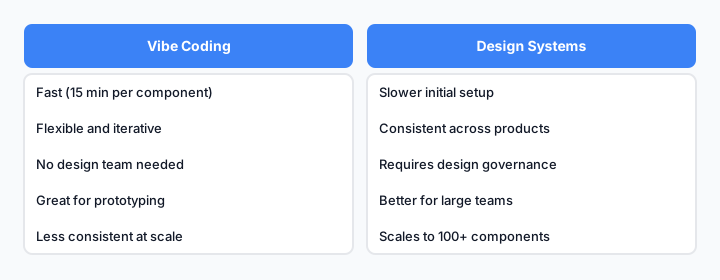
Vibe coding is fast and flexible. Design systems are consistent and scalable. Use both.
Use vibe coding when:
- You're building a new product and need to ship fast
- You're prototyping a feature
- You need a one-off component
- You don't have a designer on the team
- You're learning component patterns
Use a design system when:
- You have multiple products or teams
- You need consistency across 50+ components
- You have a design team maintaining standards
- You're building a platform with strict brand guidelines
- You need long-term maintainability
The hybrid approach:
Start with vibe coding. As you build, extract common patterns into a design system. Use the design system for future projects. This is how most successful teams actually work.
Real Examples: From Capture to Production
Example 1: Dashboard Card
You find a nice card layout on a SaaS dashboard. You capture it. It looks like:
<div class="bg-white rounded-lg shadow p-6">
  <h3 class="text-lg font-semibold">Title</h3>
  <p class="text-gray-600 text-sm">Subtitle</p>
  <div class="mt-4">Content</div>
</div>
You prompt Cursor:
"Convert to React. Add a variant prop for 'default' and 'highlighted'. Make the highlighted version have a blue border and background tint."
Result: a reusable card component with variants, ready to use across your app.
Example 2: Form Input
You capture a form input from a modern web app. It has nice focus states and error handling. You paste it and ask:
"Make this a controlled React component. Add validation. Support required, disabled, and error states. Use Tailwind."
Cursor generates a fully-featured input component with all the states you need.
Example 3: Pricing Table
You capture Stripe's pricing table. You ask Cursor:
"Convert to React. Make it accept a JSON array of pricing tiers. Add a toggle for annual/monthly. Include a 'most popular' badge on one tier."
You get back a data-driven component that you can reuse across your product.
Tools That Actually Work Together

A practical vibe coding stack: capture tool + AI editor + component library.
| Tool | Purpose | Why It Matters |
|---|---|---|
| Element Armory | Capture HTML + CSS | Clean, computed styles; no bloat |
| Cursor | AI-assisted refactoring | Understands context; generates variations |
| Claude (web) | Backup AI for complex prompts | Better for long-form explanations |
| Tailwind CSS | Styling framework | Pairs well with captured UI; easy to adapt |
| React/Vue/Svelte | Component framework | Your choice; vibe coding works with all |
| Git | Version control | Track component iterations |
The stack is minimal. You don't need a design tool. You don't need Figma. You don't need a component library generator. You need a capture tool, an AI editor, and a framework.
Getting Started Today
- Install Element Armory (or similar capture tool)
- Open Cursor and set up
.cursorruleswith your component standards - Find a reference UI for something you need to build
- Capture it (2 minutes)
- Paste into Cursor and write a prompt (5 minutes)
- Copy the result into your project (2 minutes)
- Test and ship (5 minutes)
Total time: 15 minutes per component.
Compare that to traditional design-first (3-4 weeks) and you'll understand why vibe coding is becoming the default for fast-moving teams.
The key insight: you don't need to be a designer to build beautiful UI. You need to know how to recognize good patterns, extract them, and adapt them. That's a skill you can learn in a day.