
The Future of Frontend Tools Is Here-And It's Not About Frameworks
The future of frontend development isn't about choosing between React, Vue, or Angular. It's about building with AI, automating repetitive work, and capturing production UI to feed into intelligent workflows. AI-powered tools are reshaping how teams build interfaces, and the teams that adopt these practices now will ship 3x faster than those still relying on manual CSS work and static design handoffs.
The shift is already underway. Over 56% of developers are using AI to boost productivity, and the tools that win in 2026 aren't frameworks-they're the ones that integrate seamlessly with AI coding assistants like Cursor and Claude, enable instant component capture, and make design systems machine-readable.
The Shift: From Framework Wars to AI-Integrated Workflows
For years, the frontend conversation centered on frameworks. React vs Vue. Angular vs Svelte. Which library has the best DX? Which scales best?
That conversation is over.
The real trend shaping frontend development is the integration of AI into the development workflow itself. The tools that matter now are the ones that:
- Capture production UI instantly
- Feed real code into AI assistants
- Automate component extraction and reuse
- Make design systems queryable by machines
This isn't theoretical. Teams using AI automation for frontend development are reducing component build time by 60-70%. They're not writing CSS from scratch-they're capturing it from production, feeding it to Claude or Cursor, and iterating in real time.
The framework you choose matters less than how you integrate AI into your workflow.
AI-Powered Development Is No Longer Optional
56% of developers are already using AI to boost productivity, and that number is climbing. But there's a gap: most teams are using AI reactively-asking ChatGPT to write a button component from scratch.
The teams winning in 2026 are using AI differently. They're feeding real code into their AI tools.
Capturing UI for AI coding means taking actual HTML and CSS from production websites, pasting it into Cursor or Claude, and letting the AI understand the real constraints, patterns, and structure of your codebase. This is fundamentally different from asking an AI to generate code in a vacuum.
When you show AI the actual website code you're working with, it:
- Understands your design system
- Respects your existing patterns
- Generates code that fits your stack
- Reduces iteration cycles by 50%+
This is the future. Not "AI writes code." But "AI understands your code and helps you build faster."
Design Systems Are Becoming Machine-Readable
Static design systems are becoming obsolete. The design systems that win in 2026 are the ones that machines can query, understand, and generate from.
AI and design systems are converging. Teams are moving from "here's a Figma file" to "here's a queryable, machine-readable component library that AI can understand and extend."
This means:
- Components have structured metadata
- Design tokens are programmatically accessible
- AI can generate variants automatically
- Design systems become generative, not prescriptive
The implication is massive: your design system isn't just documentation anymore. It's infrastructure that powers both human and machine workflows.
Component Capture and Reuse Are Now Core Skills
Manually rebuilding components is dead.
Automating component capture for AI-assisted development is becoming a core skill for frontend teams. Instead of:
- Inspecting an element in DevTools
- Copying CSS manually
- Rebuilding the component
- Testing it
Teams are now:
- Clicking an element with a capture tool
- Instantly getting clean HTML + CSS
- Feeding it to Claude or Cursor
- Iterating in seconds

The modern component workflow: capture, feed to AI, iterate.
This isn't just faster. It's a fundamentally different way of building. You're not writing CSS-you're capturing patterns and adapting them.
Building scalable UI systems now means having a library of captured components that you can remix, adapt, and extend with AI assistance.
The Rise of Generative UI and Adaptive Interfaces
Static UI is becoming a liability.
Emerging technologies in 2026 include generative UI and adaptive interfaces that respond to user behavior and context. This means:
- Interfaces that adapt to user preferences
- Components that generate variants based on data
- Layouts that respond to context, not just viewport size
- UI that learns and improves over time
This requires a different approach to component design. You can't hardcode every variant. You need systems that generate UI dynamically.
The evolution of UI building from static handoffs to generative systems is forcing teams to think differently about how they structure components, manage state, and handle responsive design.
Automation Tools Are Replacing Manual CSS Work
DevTools is still useful for debugging. But for component extraction and reuse, it's slow.
Faster CSS inspection workflows are replacing the manual DevTools approach. Teams are using tools that:
- Capture computed styles instantly
- Extract clean, reusable CSS
- Work with AI coding assistants
- Save hours of manual work per week
The comparison is stark:
| Approach | Speed | Reusability | AI Ready | Effort |
|---|---|---|---|---|
| Manual DevTools | Slow (5-10 min per component) | Low | No | High |
| Automated Capture | Fast (10 seconds) | High | Yes | Low |
When you're building 20 components a week, the time savings compound. A tool that saves 5 minutes per component saves 100 minutes per week-that's 2 hours of developer time reclaimed.
TypeScript and Type Safety Become Non-Negotiable
TypeScript adoption is accelerating across frontend teams, and for good reason. As codebases grow and AI tools become more integrated, type safety isn't optional-it's foundational.
Teams using TypeScript with AI tools see:
- Better AI code generation (AI understands your types)
- Fewer runtime errors
- Faster refactoring
- Better IDE support
The future frontend stack is typed. Period.
Performance and Accessibility Are Baseline Expectations
Accessibility compliance and performance-first design are now baseline expectations, not nice-to-haves.
This means:
- Every component must be accessible by default
- Performance budgets are non-negotiable
- Core Web Vitals are tracked continuously
- Accessibility testing is automated
Teams that treat these as afterthoughts will fall behind. The tools that win are the ones that make accessibility and performance easy, not hard.
The Future Frontend Stack: What's Actually Winning in 2026
Here's what the winning stack looks like:
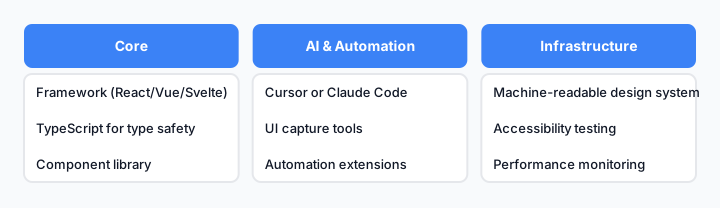
The 2026 frontend stack: AI-integrated, component-first, automation-heavy.
- Framework: React, Vue, or Svelte (the choice matters less than integration)
- Type System: TypeScript (non-negotiable)
- Component Capture: Code-first UI capture tools for instant extraction
- AI Integration: Cursor or Claude Code for AI-assisted development
- Design System: Machine-readable, queryable, generative
- Automation: Frontend automation tools to eliminate manual work
- Testing: Automated accessibility and performance testing
The teams that assemble this stack will ship 3x faster than those still using manual workflows.
How to Prepare Your Team for the Next Wave
If you're a tech lead or senior engineer, here's what to do now:
1. Start capturing UI from production
Stop rebuilding components from scratch. Copy production-ready UI from live websites and feed it into your AI tools. This is the fastest way to build.
2. Invest in design system infrastructure
Make your design system machine-readable. Add metadata, structure tokens, and make it queryable by AI. This is the foundation for everything else.
3. Integrate AI into your workflow
Build UI faster with Cursor or Claude Code. Not as a toy-as a core part of your development process. Train your team on how to prompt effectively, how to feed real code into AI, and how to iterate quickly.
4. Automate repetitive work
Automate repetitive UI work with browser extensions and automation tools. Every minute spent on manual CSS extraction is a minute not spent on solving real problems.
5. Prioritize accessibility and performance
Make these non-negotiable. Automate testing. Build them into your component library. Don't treat them as afterthoughts.
6. Adopt TypeScript if you haven't already
Type safety is foundational for AI-assisted development. It makes your code more understandable to both humans and machines.
The Competitive Advantage Is Real
Teams that adopt these practices now have a 3x speed advantage over those still using manual workflows. That's not hyperbole-it's the difference between shipping a feature in a day vs a week.
The future of frontend development isn't about learning a new framework. It's about building smarter, faster, and with AI as a core part of your workflow.
The tools are here. The practices are proven. The only question is: are you ready to move faster?