
Quick Answer
AI automation for frontend development means using intelligent tools and workflows to handle repetitive tasks-component generation, style extraction, testing, deployment-so you focus on architecture and user experience. 68% of developers save at least 10 hours each week using AI tools, and the real win isn't just speed; it's shifting your energy from busywork to creative problem-solving. Tools like Cursor and Claude, paired with UI capture utilities, let you build faster without losing control over code quality.
Why Frontend Developers Are Adopting AI Automation Now
Frontend development has always been a grind. You inspect elements, copy styles, rebuild components, test across browsers, adjust spacing, refactor for performance. Each task is small, but the accumulation is exhausting.
AI-driven frontend automation is cutting development time in half, and developers are noticing. The shift isn't just about speed-it's about reclaiming mental energy. When AI handles the mechanical parts, you can focus on the decisions that actually matter: user experience, accessibility, performance trade-offs, and architectural clarity.
The tools have matured. Cursor, Claude, and similar AI assistants now understand frontend context deeply enough to generate usable code, suggest refactors, and even catch bugs before they ship. But the real leverage comes when you combine these tools with a deliberate workflow-one that feeds AI the right inputs and validates its outputs.
The Real Problem: Manual UI Work Still Dominates Frontend Workflows
Here's what most frontend teams still do:
- Designer hands off a Figma file
- Developer manually recreates components in code
- Developer inspects live websites to copy patterns or reference implementations
- Styles are extracted manually using DevTools
- Components are tested, adjusted, and often rebuilt from scratch
Each step is a context switch. Each context switch costs focus and time.
Most developers are using AI wrong-they either depend on it uncritically, generating messy code, or avoid it completely, missing significant productivity opportunities. The gap exists because there's no clear bridge between design, AI assistance, and production code. This is where capturing UI programmatically enters the picture, eliminating the manual extraction bottleneck.
This is where automation enters. Not as a replacement for judgment, but as a force multiplier for the work you're already doing.
How AI Automation Changes the Frontend Development Cycle
Traditional cycle:
Design → Manual Code → Test → Refactor → Deploy
AI-automated cycle:
Design → AI-Assisted Code (with UI capture) → Validate → Deploy
The difference is subtle but profound. Instead of writing every line, you're directing the AI. Instead of copying styles manually, you're capturing them programmatically. Instead of guessing at component behavior, you're testing against real implementations.
AI is flipping the script on software development so fast developers can barely keep up, and the teams winning are those who've built a repeatable process around it.
Core Automation Patterns for Frontend Teams
Pattern 1: Component Generation from Reference UI
Find a live example of a component you need (a pricing table, a navbar, a card layout). Instead of manually inspecting and rebuilding, capture the HTML and CSS directly. Feed it to Claude or Cursor with a prompt like:
"Convert this pricing table to a React component with TypeScript. Make it responsive and add interactivity for plan selection."
The AI now has the exact structure and styling to work from. No guessing. No manual extraction.
Pattern 2: Design-to-Code Acceleration
Pair Figma exports with AI code generation. A designer exports component specs; you feed those specs plus a reference implementation to Claude. The AI generates the initial component structure, and you refine from there.
Pattern 3: Automated Testing and Validation
Set up AI-assisted test generation. Describe a component's behavior; let Claude generate test cases. You review and adjust, but the scaffolding is done.
Pattern 4: Style System Extraction
Instead of manually documenting your design tokens, use automation to extract them from live code. Build a library of reusable styles that both humans and AI can reference.
Integrating UI Capture Into Your AI Workflow
This is where Element Armory fits into the ecosystem. Manual UI capture is slow. Programmatic capture is fast.
Here's the workflow:
- Find a reference component on a live website or your own codebase
- Capture the HTML and CSS using a UI capture tool
- Feed the captured code to Claude or Cursor with a transformation prompt
- Validate the output and integrate into your project
Example:
Captured from a SaaS landing page:
<div class="pricing-card">
  <h3>Pro Plan</h3>
  <p class="price">$99/month</p>
  <ul class="features">
    <li>Feature 1</li>
    <li>Feature 2</li>
  </ul>
  <button>Get Started</button>
</div>

/* CSS captured */
.pricing-card { ... }
Prompt to Claude:
"Convert this pricing card to a React component. Add state management for annual/monthly toggle. Make it accessible with ARIA labels."
The AI now has concrete structure to work from, not a vague description. AI tools for frontend developers are transforming how teams approach design-to-code workflows, and the ones that integrate UI capture see the fastest results.
AI Tools That Work Best for Frontend Automation
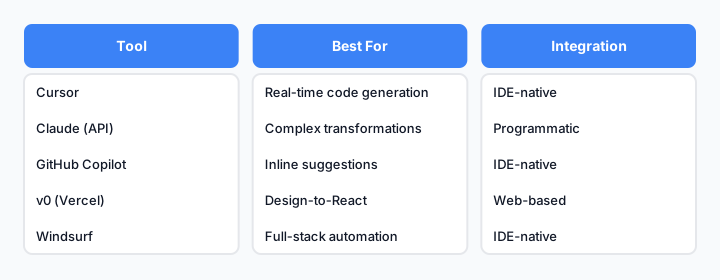
Comparison of leading AI tools for frontend automation workflows.
| Tool | Best For | Integration | Learning Curve |
|---|---|---|---|
| Cursor | Real-time code generation & refactoring | IDE-native | Low |
| Claude (API) | Complex transformations & architecture | Programmatic | Medium |
| GitHub Copilot | Inline suggestions & completions | IDE-native | Low |
| v0 (Vercel) | Design-to-React conversion | Web-based | Low |
| Windsurf | Full-stack automation | IDE-native | Medium |
The best tool depends on your workflow. If you're working in the IDE, Cursor wins. If you're building a custom pipeline, Claude API is more flexible. If you need design-to-code, v0 is purpose-built. Learn how to integrate these tools into your development process.
Building Reusable Components Faster With Automation
Automation shines when you're building component libraries. Here's a repeatable process:
- Identify a pattern you'll use repeatedly (buttons, cards, modals)
- Find or create a reference implementation
- Capture the structure (HTML + CSS)
- Generate variations using AI (sizes, colors, states)
- Document and test the component family
- Reuse across projects
This turns a 2-hour manual task into a 20-minute automated one. And the component is documented, tested, and ready to ship. Building a reusable component library becomes a sustainable practice rather than a one-off effort.
Avoiding Common Pitfalls When Automating Frontend Work
Pitfall 1: Over-Relying on AI Output
AI generates code fast, but not always correctly. Always review. Always test. Treat AI as a collaborator, not an oracle.
Pitfall 2: Losing Code Quality
Automation can lead to bloated, unoptimized code if you're not careful. Set standards. Review generated code against your team's guidelines. Refactor when needed.
Pitfall 3: Ignoring Accessibility
AI doesn't always prioritize a11y. Manually audit generated components for keyboard navigation, screen reader compatibility, and semantic HTML.
Pitfall 4: Skipping the Validation Step
Just because AI generated it doesn't mean it works. Test across browsers. Test with real data. Test with real users.
Pitfall 5: Not Documenting the Workflow
If only one person knows how to use the automation, it's not scalable. Document your process. Train your team. Make it repeatable.
Measuring the Impact: Time Saved, Quality Maintained
How do you know if automation is actually working?
Track these metrics:
- Time to component: How long from design to production code?
- Refactor cycles: How many iterations before code is ready?
- Bug escape rate: Are automated components shipping with more or fewer bugs?
- Developer satisfaction: Are people enjoying the work more?
According to Atlassian, 68% of developers save at least 10 hours each week using AI tools. But the real measure is whether those hours translate into better products, not just faster shipping.
Getting Started With AI Automation Today
Step 1: Choose Your AI Tool
Pick one: Cursor, Claude, or GitHub Copilot. Start with what integrates into your existing workflow.
Step 2: Define One Repeatable Task
Don't try to automate everything. Pick one task you do weekly: component generation, style extraction, test writing. Master that first.
Step 3: Build a Prompt Template
Write a clear, reusable prompt for that task. Include context: your tech stack, code style, accessibility requirements.
Step 4: Capture Reference UI
When you need a component, find a live example. Use a UI capture tool to extract the structure and feed it to your AI tool with your prompt template.
Step 5: Validate and Iterate
Review the output. Test it. Refactor if needed. Document what worked and what didn't.
Step 6: Scale
Once one task is automated, add another. Build a library of prompts. Train your team. Make it part of your standard workflow.
The Future of Frontend Automation
The real revolution in AI-driven frontend automation goes deeper than speed-it's about how we build, who we empower, and what new possibilities emerge. As these tools mature, the bottleneck shifts from code generation to decision-making. The developers who win are those who can direct AI effectively, validate its output, and maintain code quality at scale.
The tools will keep improving. The workflows will keep evolving. But the principle remains: automation should amplify your judgment, not replace it.
Start small. Build a process. Scale deliberately. That's how you turn AI from a novelty into a competitive advantage.