

Quick Answer
Building a scalable UI system means moving beyond scattered, duplicated components into a unified library with clear naming, structure, and governance. The fastest path is to extract reusable patterns from your existing product, organize them by layer (primitives, components, patterns), establish naming conventions, and automate maintenance as you grow. This eliminates design debt, speeds up feature delivery, and keeps your team aligned on a single source of truth.
Why Scattered UI Components Cost You Speed and Consistency
Every product starts the same way: a button here, a card there, a modal somewhere else. Each feature team builds what they need. It works. Then you ship five more features, and suddenly you have three different button styles, two card implementations, and four modal variations across your codebase.
Struggling with inconsistent interfaces and duplicated design work is a common challenge when products grow without a unified system. When components aren't centralized, developers waste time rebuilding the same UI elements. Designers can't enforce consistency. Teams don't share a common language. Every new feature becomes slower because you're solving the same problems repeatedly.
The cost compounds. A scalable design system reduces design debt and streamlines workflow, but without one, you're paying that debt every sprint. Onboarding new engineers takes longer. Code reviews focus on style inconsistencies instead of logic. Your product feels fragmented to users.
The solution isn't to redesign everything from scratch. It's to extract what you already have, organize it intentionally, and build a system that grows with you.
What Makes a UI System Scalable (Not Just a Component Folder)
A component folder is not a design system. A design system is a living, documented, governed set of reusable elements with clear rules for when and how to use them.
Scalable component architecture enhances efficiency and maintainability within development teams. The difference between a folder and a system is intentionality. A system has:
- Clear hierarchy: Primitives (buttons, inputs) → Components (forms, cards) → Patterns (workflows, layouts)
- Naming conventions: Consistent, predictable names that developers can guess
- Documentation: Not just code, but when and why to use each element
- Governance: Rules about what gets added, how it's versioned, and who maintains it
- Automation: Tools that keep the system in sync with your product
Without these, you end up with a graveyard of unused components and developers who ignore the library because it's easier to build their own.
The Three Layers of a Scalable Design System
Think of your system in three layers, each building on the last:
Layer 1: Primitives (Atoms)
These are the smallest, most reusable units: buttons, inputs, labels, icons, spacing tokens, color tokens. They have no business logic. They're pure presentation.
Example:
Button(primary, secondary, danger variants)Input(text, email, password)Icon(24px, 32px sizes)Spacing(4px, 8px, 16px, 24px increments)
Layer 2: Components (Molecules)
These combine primitives into functional units: forms, cards, modals, dropdowns, navigation bars. They still don't contain business logic, but they're more opinionated about structure.
Example:
FormField(input + label + error state)Card(header + body + footer)Modal(overlay + header + content + actions)Navbar(logo + nav items + user menu)
Layer 3: Patterns (Organisms)
These are page-level or feature-level compositions: login flows, dashboard layouts, onboarding sequences. They combine components and add business logic.
Example:
LoginFlow(email input → password input → submit → success/error)DashboardLayout(sidebar + header + main content)SettingsPanel(tabs + form fields + save/cancel)
This layering matters because it lets you scale independently. You can update a button primitive and it cascades through all components that use it. You can add a new component without touching primitives. You can build new patterns without changing the component library.
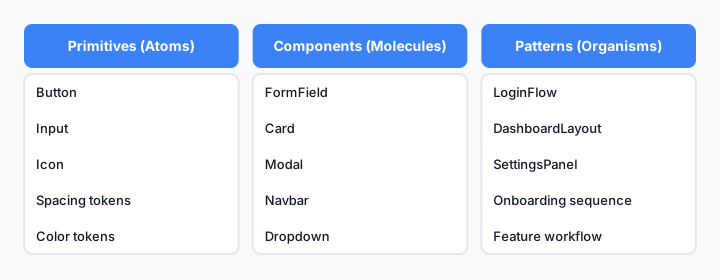
Three-layer architecture: primitives form the foundation, components build on primitives, patterns compose components into workflows.
How to Extract Reusable Components from Your Existing Product
You don't start with a blank slate. You start by auditing what you already have.
Step 1: Inventory Your UI
Walk through your product and screenshot every distinct UI element. Group them by type: buttons, inputs, cards, modals, etc. You'll likely find 3-5 variations of things that should be the same.
Step 2: Identify Patterns
Look for elements that appear in multiple places. A button style used in three features is a candidate for extraction. A form layout repeated across settings pages is a pattern.
Step 3: Extract the Simplest First
Start with primitives. Extract your button styles into a single Button component with variants. Then inputs. Then spacing and color tokens. These are low-risk, high-impact extractions.
Step 4: Build Components from Primitives
Once primitives are solid, combine them into components. A form field is an input + label + error message. A card is a container with padding and a border. These should be built from your primitives, not from scratch.
Step 5: Document as You Go
For each component, write:
- What it is (one sentence)
- When to use it (and when not to)
- Variants and states
- Code example
This takes 10 minutes per component and saves hours of confusion later.
Building Your Component Library: Structure and Naming Conventions
How you organize and name components determines whether developers will actually use your system.
Folder Structure
/components
  /primitives
    /button
    /input
    /icon
    /spacing
  /components
    /form-field
    /card
    /modal
    /navbar
  /patterns
    /login-flow
    /dashboard-layout
    /settings-panel
Naming Conventions
Use clear, predictable names:
- Primitives:
Button,Input,Icon(simple, noun-based) - Components:
FormField,ModalHeader,NavbarItem(compound, descriptive) - Patterns:
LoginFlow,DashboardLayout,SettingsPanel(feature-based)
Avoid:
- Generic names like
Container,Wrapper,Box(unless they're truly generic primitives) - Abbreviations like
Btn,Inp,Nav(spell it out) - Names that describe implementation instead of purpose (use
Card, notBorderedDiv)
Variants and Props
Be explicit about what each component accepts:
<Button variant="primary" | "secondary" | "danger" size="sm" | "md" | "lg" disabled={boolean} />
<Input type="text" | "email" | "password" state="default" | "error" | "success" />
This clarity prevents developers from guessing and building their own versions.
Scaling Your System as Your Product Grows
A system that works for 5 developers breaks at 50. Here's how to scale it:
Versioning
Use semantic versioning. Breaking changes (removing a component) = major version. New components = minor version. Bug fixes = patch version. This lets teams upgrade on their schedule.
Governance
Create a lightweight process:
- Who can propose new components? (Anyone)
- Who approves additions? (Design + lead engineer)
- How often do you review? (Monthly or quarterly)
- What's the deprecation policy? (6-month notice before removal)
Without governance, your system becomes a dumping ground. With too much, it becomes a bottleneck.
Maintenance
Assign ownership. One person or small team is responsible for:
- Reviewing component proposals
- Updating documentation
- Managing versions
- Fixing bugs
This prevents the "everyone's responsible, so no one is" problem.
Feedback Loop
Every quarter, ask developers:
- What components are missing?
- What's confusing?
- What would make your job easier?
Your system should evolve based on how people actually use it.
Automating Component Extraction and Maintenance
Manual component management doesn't scale. Automation is where you unlock real speed.
Automated Testing
Every component should have:
- Visual regression tests (catch unintended style changes)
- Accessibility tests (ensure WCAG compliance)
- Interaction tests (buttons click, inputs accept input)
This prevents bugs from shipping and gives developers confidence to refactor.
Documentation Generation
Use tools that auto-generate docs from your code:
- Storybook (React, Vue, Angular)
- Chromatic (visual testing + documentation)
- Zeroheight (design + code sync)
Write once, docs update automatically.
Dependency Tracking
Know which components depend on which primitives. When you update a primitive, you know exactly what needs testing.
Continuous Integration
Every component change should:
- Run tests
- Generate updated docs
- Update the version number
- Notify teams of changes
This keeps everyone in sync without manual coordination.
Real-World Example: From Ad-Hoc UI to Unified System
Imagine a SaaS product with three teams: Onboarding, Dashboard, and Settings. Each built their own buttons, forms, and modals.
Before:
- Onboarding uses a blue button with rounded corners
- Dashboard uses a blue button with square corners
- Settings uses a teal button with rounded corners
- Users see three different "primary" buttons
The Extraction Process:
- Audit: Screenshot all buttons. Find 7 variations.
- Consolidate: Decide on one primary button style (blue, rounded, 12px padding).
- Extract: Create
Buttoncomponent withvariant="primary"andvariant="secondary". - Migrate: Update Onboarding, Dashboard, Settings to use the new component.
- Document: Write "When to use primary vs secondary" in the docs.
- Automate: Add visual regression tests so future changes are caught.
After:
- All three teams use the same button
- New features use the button automatically
- Designers can update the button once and it cascades everywhere
- Onboarding new engineers is faster because there's one source of truth
Common Mistakes That Break Scalability
Mistake 1: Building Too Much Too Soon
Don't extract every component at once. Start with the 20% that covers 80% of your UI. Grow from there.
Mistake 2: Ignoring Accessibility
If your primitives aren't accessible, your entire system is broken. Build WCAG compliance into every component from day one.
Mistake 3: No Documentation
Code without docs is a library. Code with docs is a system. Spend time on the "why" and "when," not just the "how."
Mistake 4: Treating It as a Design Problem
A scalable design system is the backbone of consistent, efficient, and user-friendly digital experiences, but it's not just a design artifact. It's a shared contract between design, engineering, and product. Involve all three from the start.
Mistake 5: Letting It Become Bloated
Every component you add is maintenance debt. Before adding a new component, ask: "Can this be built from existing components?" If yes, don't add it.
Mistake 6: No Versioning or Deprecation Policy
If you remove a component without warning, teams break. If you never remove anything, your system becomes a graveyard. Have a clear policy.
Next Steps
Start small. Pick one primitive (button, input, or spacing). Extract it. Document it. Get feedback. Then move to the next one. A system that grows intentionally beats a perfect system that never ships.
The goal isn't perfection. It's consistency, speed, and alignment. Every component you extract is time your team doesn't spend rebuilding the same thing twice.