
Quick Answer
Building a design system from CSS means capturing styles from production websites, extracting the underlying patterns (colors, spacing, typography, components), and organizing them into reusable tokens and documented components. Instead of writing CSS from scratch, you reverse-engineer existing UI patterns from live sites, normalize them into a system structure, and integrate them into your codebase. This cuts design system creation time significantly by letting you learn from proven, production-tested interfaces.
Why Manual CSS Extraction Kills Design System Momentum
Most teams start design system work with good intentions: audit the codebase, document patterns, create tokens. Then reality hits.
You're opening DevTools on ten different pages. Copying styles. Pasting into a spreadsheet. Manually reconstructing components. Arguing about naming conventions. Realizing the colors don't match. Starting over.
By week three, momentum is gone.
The problem isn't the vision. It's the process. Manual extraction is slow, error-prone, and doesn't scale. You lose context. You miss edge cases. You end up with incomplete documentation.
What if instead of building from scratch, you captured working patterns from production websites and let those guide your system?
The Design System Extraction Problem
Design systems fail for a specific reason: the gap between intention and implementation.
You decide on a color palette. But across your product, you find 47 shades of blue. You define spacing rules. But margins are inconsistent everywhere. You want semantic component names. But the codebase has button-primary, btn-main, action-button, and cta-btn.
This chaos exists because:
- Styles evolved organically across projects and teams
- No single source of truth existed when code was written
- Manual auditing misses edge cases and context
- Documentation lags behind actual implementation
The solution isn't stricter rules. It's smarter extraction.
When you capture CSS directly from live websites, you're working with proven patterns. These styles have been tested in production. They work. They're not theoretical. You're reverse-engineering success.
How to Capture CSS From Live Websites
The fastest way to extract CSS is automated capture, not manual inspection.

Automated extraction captures HTML, computed styles, and structure in seconds.
Step 1: Identify Source Websites
Start with production sites that match your design goals:
- Your own product (if redesigning)
- Competitor products
- Industry leaders with strong design systems
- SaaS tools with consistent UI patterns
For each site, identify specific components to extract:
- Navigation bars
- Button styles and states
- Form inputs and validation states
- Cards and containers
- Typography scales
- Color usage in context
Step 2: Capture HTML and Computed Styles
Use a browser extension or tool to capture the actual rendered styles, not just the source CSS. This matters because:
- Computed styles include cascading rules
- You see what the browser actually renders
- Minified CSS becomes readable
- Vendor prefixes are resolved
The capture should include:
- Full HTML structure
- All computed CSS properties
- Pseudo-classes (hover, focus, active)
- Media queries and responsive behavior
Step 3: Extract and Normalize
Once captured, normalize the CSS:
- Remove vendor prefixes (unless targeting older browsers)
- Consolidate duplicate rules
- Identify reusable values (colors, spacing, fonts)
- Map styles to semantic tokens
Example: If you capture three buttons with slightly different padding, you might normalize to a single spacing-md token used across all three.
Step 4: Document Context
Capture isn't just code. Document:
- Where this component appears on the site
- What user action it responds to
- What states it supports (hover, disabled, loading)
- Any animations or transitions
- Accessibility attributes
This context prevents you from building a system that looks right but doesn't work right.
Organizing Extracted CSS Into System Tokens
Raw extracted CSS is useful, but a design system needs structure.
Convert extracted styles into tokens: the smallest, reusable units of design.
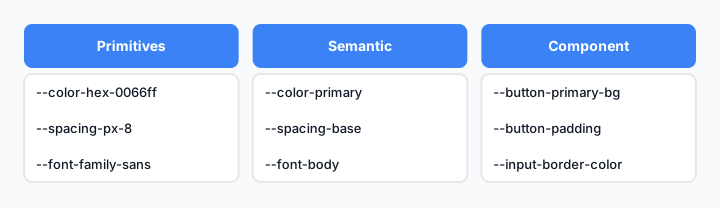
Tokens organize extracted styles into a hierarchy: primitives, semantic, and component-level.
Token Hierarchy
Primitives (Base Values)
These are raw values with no semantic meaning:
--color-hex-0066ff: #0066ff
--spacing-px-8: 8px
--font-family-sans: -apple-system, BlinkMacSystemFont, "Segoe UI", sans-serif
Semantic Tokens (Meaning)
These map primitives to intent:
--color-primary: var(--color-hex-0066ff)
--color-background: var(--color-hex-ffffff)
--spacing-base: var(--spacing-px-8)
--font-body: var(--font-family-sans)
Component Tokens (Usage)
These apply semantic tokens to specific components:
--button-primary-bg: var(--color-primary)
--button-primary-padding: var(--spacing-base) var(--spacing-base * 2)
--input-border-color: var(--color-border)
Extraction to Token Workflow
- Audit extracted styles for repeated values
- Group by category: colors, spacing, typography, shadows, borders
- Assign semantic names based on function, not appearance
- Create token files (CSS custom properties, JSON, or design token format)
- Test token coverage against all captured components
This structure makes your system maintainable. Change one token, and it cascades everywhere.
Building Component Patterns From Captured Styles
Tokens are the foundation. Components are the structure.
Once you've extracted and tokenized styles, group them into reusable component patterns.
Identify Component Boundaries
From your captured CSS, look for repeating patterns:
- Buttons: primary, secondary, ghost, loading states
- Inputs: text, email, password, with validation states
- Cards: with images, with actions, minimal
- Navigation: horizontal, vertical, with dropdowns
Each pattern should have:
- Base styles
- Variant styles (size, color, state)
- Responsive behavior
- Accessibility attributes
Document Component Anatomy
For each component, document:
Component: Button
Variants: primary, secondary, ghost, danger
Sizes: sm, md, lg
States: default, hover, active, disabled, loading
Props: label, icon, onClick, disabled, loading
Tokens Used: --color-primary, --spacing-base, --font-body
Create Component CSS
Build component CSS using your tokens:
.button {
  padding: var(--button-padding);
  font-family: var(--font-body);
  border-radius: var(--border-radius-md);
  transition: background-color 200ms ease;
}

.button--primary {
  background-color: var(--button-primary-bg);
  color: var(--button-primary-text);
}

.button--primary:hover {
  background-color: var(--button-primary-bg-hover);
}

.button:disabled {
  opacity: 0.5;
  cursor: not-allowed;
}
This approach ensures consistency. Every button uses the same tokens. Every state is documented. New developers understand the system immediately.
Documenting Your Extracted Design System
A design system without documentation is just a folder of CSS.
Documentation serves two audiences: designers and developers.
What to Document
For Each Component:
- Visual examples (screenshots or live previews)
- HTML structure
- CSS classes and tokens used
- Props and configuration options
- Accessibility requirements (ARIA, keyboard navigation)
- Usage examples
- Common mistakes to avoid
For Tokens:
- Visual swatches (colors)
- Scale visualization (spacing, sizing)
- Usage guidelines (when to use which token)
- Fallback values
For the System:
- Design principles
- Token naming conventions
- Component naming conventions
- Responsive breakpoints
- Browser support
- Versioning strategy
Documentation Tools
Tools like Storybook and Styleguidist help document components with live previews. But even a well-organized Markdown site works if it's kept current.
The key: documentation lives close to code. If it's separate, it will drift.
Scaling Your System With Reusable Patterns
A design system isn't static. It grows as your product grows.
Pattern Reuse Strategy
Once you've built core components, look for opportunities to compose them:
- Buttons + Icons = Icon buttons
- Inputs + Labels + Validation = Form fields
- Cards + Buttons = Action cards
- Navigation + Dropdowns = Complex menus
Each composition should be documented as a new pattern, not a new component.
Versioning and Maintenance
As you scale:
- Version your tokens (major.minor.patch)
- Deprecate old patterns gradually
- Test changes across all consuming projects
- Communicate updates to teams using the system
A design system that breaks consuming projects on every update will be abandoned. Stability matters.
Extending the System
Teams will need components you didn't anticipate. Create a process for adding new patterns:
- Propose the new component with use cases
- Review against existing tokens and patterns
- Build using system conventions
- Document with examples
- Release as a new version
This keeps the system growing without becoming chaotic.
Common Mistakes When Building Systems From CSS
Mistake 1: Extracting Without Understanding Context
You capture a button's CSS, but miss that it only appears in specific contexts. Later, you use it somewhere it doesn't fit. Always document where and why a component exists.
Mistake 2: Creating Too Many Tokens
Every color variation becomes a token. Every spacing value gets a name. Your token file becomes unmaintainable. Limit tokens to values that actually vary across your product.
Mistake 3: Ignoring Responsive Behavior
You extract desktop styles but miss how components adapt on mobile. Your system works on large screens and breaks on small ones. Always capture responsive behavior during extraction.
Mistake 4: Skipping Accessibility
You get the visual styles right but miss ARIA attributes, keyboard navigation, and color contrast. A beautiful system that fails accessibility audits is broken. Document accessibility requirements alongside visual styles.
Mistake 5: Building Without Buy-In
You create a perfect system, but teams keep writing custom CSS because they weren't involved in the process. Design systems succeed when teams help build them. Involve stakeholders early.
Tools That Speed Up CSS-to-System Workflows
Manual extraction is slow. Tools accelerate the process.
| Tool | Purpose | Best For |
|---|---|---|
| Browser DevTools | Inspect and copy styles | Quick audits, small components |
| Element Armory | Capture HTML + CSS from any website | Rapid component extraction, reusable code |
| Figma | Design tokens and component specs | Design-to-code handoff |
| Storybook | Component documentation and testing | Living documentation, visual regression |
| Token Studio | Design token management | Token versioning and sync |
| Chromatic | Visual testing for components | Preventing regressions |
The fastest workflow combines automated capture (Element Armory) with documentation tools (Storybook) and token management (Token Studio or CSS custom properties).
Integrating Extracted Styles Into Your Codebase
Extraction and organization are worthless if the system doesn't integrate into your actual projects.
Integration Patterns
Option 1: CSS Custom Properties
Publish tokens as CSS variables. Teams import and use them:
@import url('design-system/tokens.css');

.my-button {
  background-color: var(--color-primary);
  padding: var(--spacing-base);
}
Option 2: CSS-in-JS
Export tokens as JavaScript objects:
export const tokens = {
  colors: {
    primary: '#0066ff',
    background: '#ffffff',
  },
  spacing: {
    base: '8px',
  },
};
Option 3: Design Token Format
Use a standard format (JSON, YAML) and generate outputs for multiple platforms:
{
  "color": {
    "primary": {
      "value": "#0066ff",
      "type": "color"
    }
  }
}
Adoption Strategy
- Start small: Extract and integrate one component category (buttons, for example)
- Measure impact: Track time saved, consistency improvements
- Expand gradually: Add more components as teams adopt the system
- Gather feedback: Listen to teams using the system and iterate
A design system that solves real problems gets adopted. One that feels like overhead gets ignored.
Moving Forward
Building a design system from CSS isn't about perfection. It's about capturing what works, organizing it, and making it reusable.
Start by extracting one component from a site you admire. Tokenize it. Document it. Use it in a project. Then repeat.
The system grows from there. Each extraction teaches you something about your own design patterns. Each iteration makes the next one faster.
The teams that win aren't the ones with the most perfect systems. They're the ones that actually use them.