

Quick Answer
DivMagic is a solid tool for designers converting static designs into code, but it's optimized for design-system exports and Tailwind/React conversion-not for AI coding workflows. If you're using Cursor or Claude Code and need to capture real website UI and feed it directly into your AI assistant, Element Armory is the better choice. It extracts clean, production-ready HTML and CSS in seconds, integrates natively with AI tools, and doesn't force you through design-system abstractions.
Why DivMagic Falls Short for AI Coding Workflows
DivMagic has built a user base of 10,000+ developers and designers who rely on it for copying website elements. But there's a critical gap: DivMagic was designed for design conversion, not AI-assisted development.
Here's the friction:
Design-first mindset. DivMagic's core strength is converting visual designs into structured code. It's built around the assumption that you're starting with a design file or screenshot and want to generate clean, framework-specific output (Tailwind, React JSX). This is excellent for design-to-code workflows.
AI workflows are different. When you're using Cursor or Claude Code, you're not converting a design-you're capturing real, production-tested UI from a live website and feeding it directly into your AI assistant. You want the actual HTML and CSS that's already working, not a reinterpreted version.
Abstraction overhead. DivMagic's conversion pipeline (design → component format → Tailwind/React) adds steps. For AI coding, you want the raw, clean code as fast as possible. Every abstraction layer slows down your workflow and introduces interpretation errors.
Limited AI integration. DivMagic doesn't have native hooks for AI tools. You capture code, then manually paste it into Cursor or Claude. There's no seamless handoff.
The Core Difference: Design Conversion vs AI-Ready Code Extraction
The fundamental difference between DivMagic and tools built for AI coding comes down to intent.
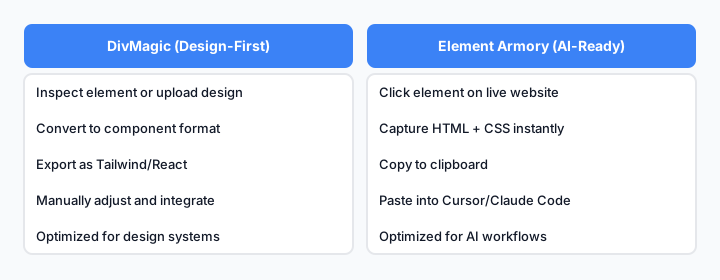
DivMagic optimizes for design interpretation; Element Armory optimizes for code fidelity and AI integration.
DivMagic's workflow:
- Inspect element or upload design
- Convert to component format
- Export as Tailwind/React
- Manually adjust and integrate
Element Armory's workflow:
- Click any element on a live website
- Capture computed HTML + CSS instantly
- Copy to clipboard or save to library
- Paste directly into Cursor/Claude Code
The difference matters because 88% of US developers report support for AI tools, and those developers need workflows that accelerate AI-assisted coding, not add friction.
How Element Armory Integrates With Cursor and Claude Code
This is where the real advantage emerges.
With Cursor: You capture a component from a live website, paste the HTML and CSS into your Cursor chat, and ask Claude to modify it. The AI has the actual working code as context, not an interpreted version. This leads to faster, more accurate iterations.
With Claude Code: Capture UI for Claude Code workflows let you feed production components directly into your AI assistant. Claude sees the real styles, real structure, and can adapt them with precision.
Why this matters: 84% of developers use AI coding tools daily, yet only 29% trust the output. Trust increases when the AI has real, working code to reference. Abstracted or reinterpreted code introduces uncertainty.
Element Armory gives your AI assistant the ground truth: the actual HTML and CSS from a production website.
Speed Comparison: DivMagic vs Element Armory in Real Workflows
| Workflow Step | DivMagic | Element Armory |
|---|---|---|
| Capture element | Inspect + upload or screenshot | One click on live site |
| Processing time | 3-5 seconds (conversion) | <1 second (direct capture) |
| Output format | Tailwind/React/component | Clean HTML + CSS |
| Abstraction layer | Yes (design interpretation) | No (raw code) |
| AI integration | Manual copy-paste | Native clipboard + library |
| Reusability | Component-focused | Code-focused |
| Learning curve | Moderate (format options) | Minimal (one-click) |
The speed difference compounds. If you're capturing 5-10 components per day, Element Armory saves 10-15 minutes of overhead. Over a week, that's an hour of reclaimed time.
When DivMagic Still Makes Sense (and When It Doesn't)
Use DivMagic if:
- You're converting static design files (Figma, Adobe XD) into code
- You need Tailwind or React JSX output specifically
- You're building a design system from scratch and want normalized components
- Your team uses design-first workflows
Use Element Armory if:
- You're capturing UI from live websites for reuse
- You're working with AI coding assistants (Cursor, Claude Code)
- You want production-tested code, not interpreted designs
- You need speed and minimal friction
- You're building UI faster with Cursor and need real code context
The choice isn't about which tool is "better"-it's about which tool fits your workflow.
Building AI-Assisted Components: A Practical Workflow
Here's how a real workflow looks with Element Armory + Cursor:
Step 1: Find a reference component You spot a well-designed pricing table on a SaaS website. You want something similar for your project.
Step 2: Capture with Element Armory Click the pricing table. Element Armory captures the HTML and CSS in under a second. Copy to clipboard.
Step 3: Paste into Cursor Open Cursor, paste the HTML and CSS into your chat. Ask Claude: "Adapt this pricing table for my product. Change the colors to match my brand, update the pricing tiers, and make it responsive for mobile."
Step 4: Iterate Claude generates the modified code. You review it, ask for tweaks, and iterate. Because Claude has the actual working code as context, iterations are faster and more accurate.
Step 5: Deploy Copy the final code into your project. Done.
This workflow is impossible with DivMagic because the conversion step introduces interpretation. You'd be asking Claude to modify an abstracted version of the code, not the real thing.
FAQ: DivMagic for AI Coding
Q: Can I use DivMagic with Cursor or Claude Code? Yes, but it's not optimized for it. You'd capture code, convert it to Tailwind/React, then manually paste it into your AI assistant. Element Armory skips the conversion step entirely.
Q: Does DivMagic's Tailwind output work better with AI? Not necessarily. AI tools like Claude understand raw HTML and CSS just fine. The Tailwind conversion adds a layer of abstraction that can actually slow down AI reasoning. Raw code is clearer.
Q: Is DivMagic cheaper? Pricing varies by plan. Both tools offer free and paid tiers. Cost isn't the differentiator-workflow fit is.
Q: Can I use both tools? Absolutely. Use DivMagic for design-to-code projects. Use Element Armory for AI-assisted component capture. They solve different problems.
Getting Started With Element Armory for AI Development
- Install the extension from the Chrome Web Store
- Navigate to any website with UI you want to capture
- Click any element to capture its HTML and CSS
- Copy to clipboard or save to your snippet library
- Paste into Cursor or Claude Code and iterate with your AI assistant
The entire process takes seconds. No design files, no conversion steps, no friction.
Learn how to use real UI with Cursor AI for a deeper dive into AI-assisted workflows.
For teams building scalable UI systems, capturing production code is the fastest way to extract patterns and normalize components across projects.
The Bigger Picture
Nearly half of all code is now AI-generated, and that trend is accelerating. The tools that win aren't the ones that add abstraction layers-they're the ones that get out of the way and let developers work faster.
DivMagic solved a real problem for designers. But the developer landscape has shifted. AI coding assistants are now the primary tool for many teams, and those teams need DivMagic alternatives that integrate seamlessly with their AI workflows.
Element Armory is built for that reality.