

Quick Answer
If you're using DivMagic and want faster UI extraction, Element Armory is the strongest alternative for developers who need production-ready code without friction. It captures clean HTML and CSS in seconds, integrates seamlessly with AI coding tools like Cursor, and has a gentler learning curve than DivMagic. Other solid options include CSS Peeper (lightweight, visual), SnipCSS (component-focused), and CSS Scan Pro (detailed inspection). The best choice depends on your workflow: speed-first developers prefer Element Armory; visual learners prefer CSS Peeper; component builders prefer SnipCSS.
Why Developers Are Switching From DivMagic
DivMagic has been a reliable tool for copying design from websites, but it's showing its age in 2026. The core issue isn't that it doesn't work-it's that it wasn't built for modern AI-assisted development workflows.
Developers switching away cite three consistent pain points:
1. Slow capture and export process
DivMagic requires multiple steps: inspect, select, configure, then export. For developers working with Cursor or Claude Code, this friction breaks flow. You're context-switching between the extension and your editor multiple times per component.
2. Code quality inconsistencies
The exported code sometimes includes unnecessary styles, bloated selectors, or formatting that requires cleanup before it's usable. When you're trying to move fast, this overhead adds up.
3. Limited AI integration
DivMagic wasn't designed with AI coding assistants in mind. It doesn't optimize output for tools like Cursor, which means you're often re-prompting your AI to clean up the captured code.
These aren't dealbreakers for casual use, but for developers extracting 5-10 components per day, the cumulative time loss is significant.
DivMagic vs Element Armory: Head-to-Head Comparison
Element Armory was built specifically to address these gaps. Here's how they compare on the metrics that matter most to developers:
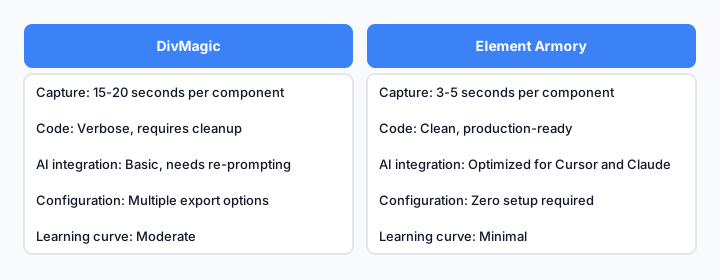
Direct comparison of capture speed, code quality, and workflow integration.
Capture Speed
Element Armory: Click element, get code. No configuration needed. Average time: 3-5 seconds per component.
DivMagic: Inspect, select, configure export settings, copy. Average time: 15-20 seconds per component.
Code Quality
Element Armory: Outputs clean, minimal HTML and computed CSS. No bloat. Ready to paste into your project or AI editor.
DivMagic: Includes all computed styles, which can be verbose. Requires manual cleanup for production use.
AI Workflow Integration
Element Armory: Designed for AI coding. Output format works natively with Cursor and Claude Code without re-prompting.
DivMagic: Works with AI tools, but output often needs reformatting or style pruning before it's useful in an AI context.
Learning Curve
Element Armory: Minimal. Open extension, click element, done.
DivMagic: Moderate. Requires understanding export options and style filtering.
Best DivMagic Alternatives for 2026
The alternative landscape has expanded significantly. Here are the tools worth considering:
Element Armory
Best for: Speed-first developers, AI-assisted workflows, component reuse.
Element Armory is purpose-built for developers who need production-ready UI code fast. It captures HTML and computed CSS in a single click, with no configuration overhead. The output is clean and minimal, making it ideal for pasting directly into your project or feeding into Cursor.
Key advantage: It's the only tool optimized specifically for AI coding workflows. If you're using Cursor or Claude Code, this is the fastest path from inspiration to implementation.
CSS Peeper
Best for: Visual learners, design inspection, color and typography extraction.
CSS Peeper is lightweight and visual. It shows you colors, fonts, spacing, and other design properties in an easy-to-read sidebar. It's excellent for understanding how a design is built, but less focused on exporting reusable code.
Use CSS Peeper when you need to understand design decisions. Use Element Armory when you need to extract and reuse components.
SnipCSS
Best for: Component-focused developers, design system building.
SnipCSS is built around the idea of saving and organizing UI snippets. It's stronger for developers building their own component libraries and want to organize captures by category.
The trade-off: It's slower than Element Armory for quick captures, but better if you're systematically building a reusable library.
CSS Scan Pro
Best for: Detailed CSS inspection, learning how sites are styled.
CSS Scan Pro is a premium tool that gives you detailed CSS inspection with a clean interface. It's excellent for understanding complex stylesheets, but overkill if you just need to extract a component quickly.
CSS Peeper vs SnipCSS vs Element Armory: Which Is Fastest?
Speed matters when you're extracting multiple components in a session. Here's a real-world comparison:
Scenario: Extract a navbar component from a SaaS website
Element Armory workflow:
- Open extension
- Click navbar element
- Copy HTML + CSS
- Paste into editor
Time: 5 seconds. Code is production-ready.
CSS Peeper workflow:
- Open extension
- Inspect navbar
- Review colors, fonts, spacing in sidebar
- Manually reconstruct HTML
- Copy relevant CSS rules
Time: 2-3 minutes. Useful for learning, not for quick extraction.
SnipCSS workflow:
- Open extension
- Select navbar element
- Configure snippet settings
- Save to library
- Export or copy
Time: 30-45 seconds. Good if you're building a library; slower for one-off extractions.
Winner for speed: Element Armory, by a significant margin.
How Element Armory Saves Hours on UI Extraction
The time savings compound when you're working on a real project. Consider a typical week:
Using DivMagic:
- Monday: Extract 3 components (1 hour total)
- Wednesday: Extract 5 components (1.5 hours total)
- Friday: Extract 4 components (1.2 hours total)
Weekly time spent on extraction: 3.7 hours
Using Element Armory:
- Monday: Extract 3 components (15 minutes total)
- Wednesday: Extract 5 components (25 minutes total)
- Friday: Extract 4 components (20 minutes total)
Weekly time spent on extraction: 1 hour
Weekly time saved: 2.7 hours
Over a year, that's roughly 140 hours-equivalent to 3.5 weeks of full-time work. For a developer billing hourly, that's meaningful money. For a team, it's even more significant.
The savings come from:
- No configuration overhead
- No code cleanup required
- Faster context-switching between extension and editor
- Better integration with AI tools (fewer re-prompts)
DivMagic Limitations and Why They Matter
DivMagic is still functional, but it has real limitations in modern workflows:
1. Export configuration friction
DivMagic requires you to choose export settings each time. Do you want CSS? HTML? Both? Minified? This decision tree slows you down, especially when you're extracting multiple components.
2. Verbose CSS output
DivMagic exports all computed styles, which is thorough but bloated. You often get 50+ lines of CSS when you only need 10. Cleaning this up manually is tedious.
3. No AI-first design
DivMagic wasn't built with AI coding assistants in mind. When you paste captured code into Cursor, you often need to re-prompt: "Clean this up," "Remove unused styles," "Make this more semantic." That's extra work.
4. Limited component organization
DivMagic doesn't have a built-in system for organizing and reusing captures. You're managing snippets manually, which doesn't scale.
These aren't fatal flaws, but they add friction to modern development workflows.
Element Armory for AI-Assisted Development Workflows
This is where Element Armory stands out most clearly. If you're using Cursor, Claude Code, or similar AI tools, the workflow difference is dramatic.
Traditional workflow (DivMagic + AI):
- Use DivMagic to capture navbar
- Paste into Cursor
- Prompt: "Clean up this CSS and make it semantic"
- AI reformats and optimizes
- Copy result back to your project
AI-optimized workflow (Element Armory):
- Use Element Armory to capture navbar
- Paste into Cursor
- Code is already clean and semantic
- Use AI to extend or modify, not to fix
The second workflow is faster because the captured code doesn't need remediation. Element Armory outputs are designed to work natively with AI tools, which means less back-and-forth.
Comparison Table: DivMagic Alternatives Ranked
| Feature | Element Armory | CSS Peeper | SnipCSS | CSS Scan Pro | DivMagic |
|---|---|---|---|---|---|
| Capture Speed | Fastest (5s) | Slow (2-3m) | Medium (30-45s) | Medium (1-2m) | Slow (15-20s) |
| Code Quality | Production-ready | Visual only | Good | Detailed | Needs cleanup |
| AI Integration | Optimized | Not designed | Moderate | Not designed | Basic |
| Learning Curve | Minimal | Minimal | Moderate | Moderate | Moderate |
| Component Organization | Basic | None | Strong | None | None |
| Free Tier | Yes | Yes | Limited | No | Yes |
| Best For | Speed + AI | Design learning | Library building | CSS inspection | General use |
When to Use DivMagic vs Modern Alternatives
DivMagic still has a place. It's not obsolete; it's just not the best choice for most modern workflows.
Use DivMagic if:
- You're extracting components occasionally (not daily)
- You don't use AI coding tools
- You prefer a familiar tool and don't mind the extra steps
- You're on a tight budget (it's free)
Use Element Armory if:
- You extract components multiple times per week
- You use Cursor, Claude Code, or similar AI tools
- You value speed and code quality equally
- You want minimal friction in your workflow
Use CSS Peeper if:
- You're learning how other sites are designed
- You need to understand color, typography, and spacing decisions
- You're not extracting full components, just design properties
Use SnipCSS if:
- You're systematically building a reusable component library
- You want to organize and categorize captures
- You're willing to trade speed for organization
Getting Started With a Better UI Capture Tool
If you're ready to move beyond DivMagic, here's how to get started:
Step 1: Install Element Armory
Add the extension to Chrome. It takes 30 seconds.
Step 2: Try a test capture
Open any website. Click an element. Copy the HTML and CSS. Paste it into your editor. You'll immediately see the difference in speed and code quality.
Step 3: Integrate with your workflow
If you use Cursor or Claude Code, paste captures directly into your editor and let the AI extend them. You'll notice you need fewer re-prompts.
Step 4: Build a snippet library
Start saving captures you reuse frequently. Over time, you'll have a personal UI library that speeds up future projects.
The transition from DivMagic takes about 10 minutes. The time savings start immediately. See the Element Armory product page or the best CSS extractor Chrome extension comparison for more detail.
The Bottom Line
DivMagic is a functional tool, but it's not optimized for 2026 development workflows. If you're extracting components regularly, especially in an AI-assisted environment, Element Armory is faster, cleaner, and more integrated with modern tools.
The choice comes down to your workflow. If you extract components occasionally and don't use AI tools, DivMagic is fine. If you're doing this multiple times per week and using Cursor or Claude Code, Element Armory will save you hours and reduce friction significantly.
Try Element Armory for a week. You'll feel the difference in speed and code quality immediately.