
Quick Answer
You can legally study and rebuild website UI designs by extracting the structure and layout (which aren't copyrightable) and recreating them from scratch. What you cannot copy: original code, images, text, fonts, or unique creative elements that define the brand. The legal line is simple: inspiration and learning are fine; duplication of protected assets is not. Modern tools like browser extensions let you capture HTML and CSS to understand how a design works, but the responsibility to rebuild it legally-without copying protected content-falls on you.
For a more conservative overview, read the companion guide on copying UI legally before turning a captured component into production code.
What 'Cloning' Actually Means (And What's Legal)
When developers talk about "cloning" a website, they usually mean one of three things:
- Visual cloning: Recreating the layout, spacing, and general appearance
- Functional cloning: Building the same features and interactions
- Code cloning: Copying the actual HTML, CSS, or JavaScript
Only the first two are potentially legal. The third is copyright infringement.
The confusion exists because UI design itself-the arrangement of buttons, cards, and navigation-is generally not copyrightable. According to copyright law, functional design elements and layouts fall into a gray area. What is protected:
- Original code (HTML, CSS, JavaScript)
- Original images, icons, and graphics
- Original text and copy
- Unique creative expressions (like a distinctive illustration style)
- Brand assets (logos, color schemes used as trademarks)
This distinction matters. You can study how a SaaS dashboard organizes its sidebar navigation and rebuild it yourself. You cannot copy the CSS file that powers it.
The Legal Line: What You Can and Cannot Copy
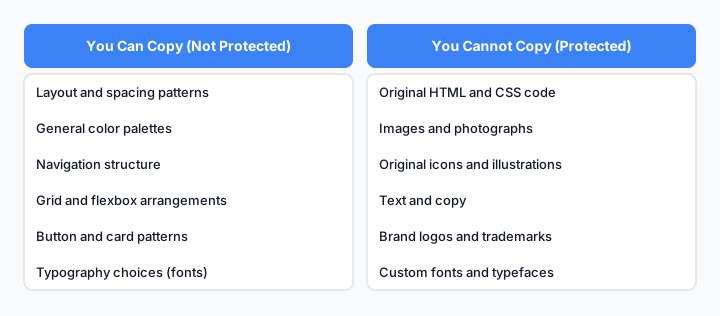
Understanding what's protected and what's fair game.
Here's the practical breakdown:
| Element | Can You Copy? | Why |
|---|---|---|
| Layout and spacing | Yes | Not copyrightable; functional design |
| HTML structure | No | Original code is copyrighted |
| CSS styles | No | Original code is copyrighted |
| Color scheme (as brand) | No | Trademark/brand protection |
| General color palette | Yes | Colors alone aren't copyrightable |
| Typography choices | Partial | Font files are licensed; using the same font is fine |
| Images and photos | No | Copyright protected |
| Icons (original) | No | Copyright protected |
| Icons (generic) | Yes | Generic shapes aren't copyrightable |
| Button styles | Yes | If you rebuild them yourself |
| Navigation patterns | Yes | If you code them from scratch |
| Unique illustrations | No | Original creative work |
| Text and copy | No | Copyright protected |
The key principle: You can copy the idea and structure, but not the execution or assets.
Inspiration vs. Duplication: The Critical Difference
This is where most developers get confused.
Inspiration means:
- You see a design pattern you like
- You understand why it works
- You rebuild it using your own code
- You adapt it to your context
- You create something new, not identical
Duplication means:
- You copy the code directly
- You copy images or assets
- You use the same text
- You create an identical or near-identical version
- You pass it off as your own work
The legal system recognizes this difference. Courts have ruled that copying the structure of a website while using different code, assets, and content is generally legal. Copying the actual code or assets is not.
Real example: You can look at how Stripe's pricing page is laid out and build your own pricing page with the same general structure. You cannot copy Stripe's CSS file or their product images.
How to Extract UI Legally Using Modern Tools
Modern browser extensions and tools make it easy to study how websites are built without copying protected content.

The legal workflow for studying and rebuilding UI.
Step 1: Capture the Structure
Use browser DevTools or an extension to inspect the HTML. You're looking at the structure-how elements are organized, not the code itself.
What you're learning:
- Is the navigation a
<nav>or a<div>? - How many columns does the grid use?
- What's the hierarchy of headings?
This is fair game. You're understanding the design, not copying the code.
Step 2: Document the Layout
Take screenshots or notes of:
- Spacing and padding
- Grid or flexbox layout
- Element positioning
- Responsive breakpoints
Again, you're documenting the design decisions, not the code.
Step 3: Identify Non-Protected Assets
Separate what you can use from what you can't:
- Can use: Generic fonts (if licensed), standard colors, common patterns
- Cannot use: Original images, custom illustrations, proprietary code
Step 4: Rebuild from Scratch
Now write your own code. Use the layout as inspiration, but:
- Write your own HTML
- Write your own CSS
- Use your own images or licensed assets
- Adapt the design to your needs
This is the legal version of "cloning."
Building Your Own Version: The Right Workflow

The step-by-step process for legally rebuilding a website UI.
Here's how professionals do it:
1. Study the original Open the website. Use DevTools. Take notes. Understand the design system.
2. Create a design brief Write down what you learned:
- Color palette
- Typography
- Layout structure
- Component patterns
- Interaction patterns
3. Design your version Use Figma, Adobe XD, or pen and paper. Create your own mockup inspired by what you learned, but adapted to your needs.
4. Code it yourself Write HTML and CSS from scratch. Don't copy-paste from the original. If you're using an extension to capture code, use it only as a reference-rewrite everything.
5. Use licensed assets
- Download fonts from Google Fonts or similar
- Use stock images or create your own
- Use icon libraries (Feather, Heroicons, etc.)
- Respect all licenses
6. Test and iterate Make sure your version works independently. It should feel inspired by the original, not identical to it.
Common Legal Mistakes Developers Make
Mistake 1: Copying CSS directly
Many developers use browser extensions to extract CSS and paste it directly into their project. This is copyright infringement, even if you change the HTML structure.
Fix: Use extracted CSS as a reference only. Rewrite it yourself.
Mistake 2: Using original images without permission
Downloading images from a website and using them in your project is theft, even if you're rebuilding the layout.
Fix: Use only licensed images or create your own.
Mistake 3: Copying unique brand elements
If a website has a distinctive illustration style, custom icon set, or unique visual treatment, copying it is infringement.
Fix: Create your own visual style or use generic, licensed alternatives.
Mistake 4: Not changing enough
If your rebuilt site looks too similar to the original-same colors, same layout, same typography, same spacing-you're in a gray area legally and ethically.
Fix: Adapt the design. Make it your own. Change colors, typography, spacing, and layout enough that it's clearly a different product.
Mistake 5: Claiming you built it from scratch when you didn't
Transparency matters. If you're rebuilding a design inspired by another site, it's fine to say so. Claiming you invented something you copied is both legally risky and ethically wrong.
Fix: Be honest about your inspiration.
Using Cloned UI in Your AI Coding Workflow
Modern AI coding tools like Cursor and Claude make it tempting to paste extracted code directly into your project. Don't.
The right way to use AI with extracted UI:
Describe the design to your AI tool instead of pasting code
- "Build a card component with a left border, shadow, and hover effect"
- Not: "Here's the CSS from a website, rebuild it"
Use extracted code as a reference for your AI prompt
- "I want something similar to how Stripe's pricing cards look"
- Your AI generates new code based on the description
Let the AI rebuild it
- The AI writes original code inspired by your description
- You get a legally clean version
Customize and adapt
- Change colors, spacing, typography
- Make it fit your brand and needs
This approach gives you the speed of AI without the legal risk of copying protected code.
Real-World Examples: Legal vs. Illegal Cloning
Example 1: Pricing Page
❌ Illegal: Download the HTML and CSS from a SaaS pricing page and use it in your project.
✅ Legal: Study how the pricing page is structured (cards in a grid, comparison table, CTA buttons), then build your own pricing page with your own code, colors, and copy.
Example 2: Dashboard Layout
❌ Illegal: Use browser DevTools to extract the CSS for a dashboard sidebar and paste it into your project.
✅ Legal: Understand that the dashboard uses a fixed sidebar with a collapsible menu, then code your own sidebar with your own styling.
Example 3: Landing Page Hero
❌ Illegal: Copy the hero section HTML and CSS from a landing page, then change the text and images.
✅ Legal: Study the hero layout (full-width background, centered text, CTA button), then design and code your own hero section from scratch.
Example 4: Component Library
❌ Illegal: Extract button, card, and input styles from a website's CSS and use them directly.
✅ Legal: Study how buttons are styled (padding, border-radius, hover states), then create your own button component with your own CSS.
Practical Developer Scenarios
- Learning from a component. Capture the HTML structure of a card or nav pattern to understand how it's built. See how to copy HTML of an element in Chrome for the manual method, or use an extraction tool for speed.
- Capturing a reference for internal prototyping. Pull structure into a throwaway prototype to test a layout idea before committing engineering time to build it from scratch.
- Rebuilding a pattern with different copy, layout, and brand tokens. Once you're shipping to production, treat the captured structure as a sketch: swap in your own text, adjust spacing and grid proportions, and apply your own color and type tokens so the result reads as your own design.
This is general guidance, not legal advice-when a project is commercially significant or the resemblance feels close, a quick check with a lawyer is cheaper than a dispute later.
The Bottom Line
Cloning website UI legally is about learning the design, not stealing the code. You can study any website, understand how it's structured, and rebuild it yourself. What you cannot do is copy the actual code, images, or unique creative elements.
The tools exist to help you learn faster. Use them to understand how designs work, not to shortcut the building process. Your own code, your own assets, your own adaptation-that's what makes it legal and, more importantly, what makes it yours.
When in doubt, ask yourself: "Did I write this code myself, or did I copy it?" If you copied it, rewrite it. That's the line between inspiration and infringement.