

The Quick Answer
CSS learning for developers isn't about memorizing properties. It's about understanding three core concepts: the cascade (how styles flow and override), specificity (why one rule wins over another), and inheritance (what gets passed down to child elements). Once these click, debugging becomes logical instead of guesswork. You'll stop relying on !important hacks and actually know why your styles work or don't.
What CSS Actually Does (Beyond Making Things Pretty)
Most developers treat CSS like a magic box: throw styles at it until something sticks. But CSS is a system with rules. CSS is responsible for the appearance of webpage elements, but more importantly, it's a cascade-a deliberate flow of rules that determine which style wins.
Think of CSS like a court system. You have rules (selectors), evidence (properties), and a judge (the browser) that decides which rule applies. The judge doesn't pick randomly. It follows a strict hierarchy.
CSS is used by 98.1% of all websites, which means understanding it deeply isn't optional-it's foundational. But most developers learn CSS backwards. They learn properties first (color, margin, padding) and never learn the system that makes those properties work.
The system is what matters.
The Cascade: Why Your Styles Aren't Working
The cascade is the "C" in CSS. It's the reason your styles sometimes work and sometimes don't.
Here's how it works:
- Browser defaults (lowest priority)
- External stylesheets (your CSS files)
- Internal stylesheets (style tags in HTML)
- Inline styles (style attribute on elements)
- !important (highest priority, but a code smell)
The cascade flows downward. Later rules override earlier ones if they have equal or higher specificity.
This is where most developers get lost. They think "I wrote this rule last, so it should win." But that's only true if specificity is equal.
Real example:
/* File 1: global.css */
button {
  background: blue;
}

/* File 2: components.css (loaded after global.css) */
button {
  background: red;
}
The button will be red because both rules have equal specificity, and the later rule wins.
But if you change it:
/* File 1: global.css */
.primary-button {
  background: blue;
}

/* File 2: components.css */
button {
  background: red;
}
The button will be blue because .primary-button has higher specificity than button, even though the button rule came later.
This is the cascade in action. Understanding it prevents hours of debugging.
Specificity Explained (Without the Confusion)
Specificity is a scoring system. Every selector gets a score, and the highest score wins.
The scoring works like this:
- Inline styles (style attribute): 1000 points
- ID selectors (#id): 100 points
- Class selectors (.class), attribute selectors ([type="text"]), pseudo-classes (:hover): 10 points
- Element selectors (button, div, p): 1 point
Example:
button { color: blue; }              /* 1 point */
.btn { color: green; }               /* 10 points */
#submit { color: red; }              /* 100 points */
<button id="submit" style="color: yellow;">  /* 1000 points */
The button will be yellow because inline styles have the highest specificity.
Most developers avoid this by using a naming convention like BEM (Block Element Modifier), which keeps specificity low and predictable. But understanding the scoring system is what lets you debug when things go wrong.
Understanding specificity is crucial for writing maintainable CSS.
Inheritance: What Gets Passed Down and Why
Not all CSS properties inherit. Some do, some don't.
Properties that inherit:
- color
- font-family
- font-size
- line-height
- text-align
Properties that don't inherit:
- margin
- padding
- border
- width
- height
- background
Why? Because it makes sense. You want text color to pass down to child elements, but you don't want a parent's margin to automatically apply to all children.
Example:
<div style="color: blue; margin: 20px;">
  <p>This text is blue (inherited)</p>
  <p>This paragraph does NOT have 20px margin (not inherited)</p>
</div>
You can force inheritance with the inherit keyword:
p {
  margin: inherit; /* Now the paragraph inherits the parent's margin */
}
Or reset it with initial:
p {
  color: initial; /* Resets to browser default, not inherited */
}
Understanding inheritance prevents you from writing redundant rules and helps you build efficient stylesheets.
The Box Model: The Foundation Everything Else Rests On
Every element in CSS is a box. Understanding the box model is non-negotiable.
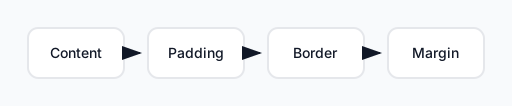
The box model: content, padding, border, and margin from inside out.
From inside out:
- Content (the actual text or image)
- Padding (space inside the border)
- Border (the edge)
- Margin (space outside the border)
Most developers confuse padding and margin. Here's the difference:
- Padding is inside the box. It affects the background color and internal spacing.
- Margin is outside the box. It creates space between this element and other elements.
Example:
.card {
  width: 300px;
  padding: 20px;  /* Space inside the card */
  margin: 10px;   /* Space around the card */
  border: 1px solid #ccc;
}
If the card is 300px wide, the content area is actually 300px minus padding minus border. This is why box-sizing: border-box is so useful-it makes width include padding and border, so your math is simpler.
How to Read CSS Like a Developer (Not a Designer)
Reading CSS is a skill. Most developers scan it. Good developers read it systematically.
When you see a selector, ask:
- What element does this target? (the selector)
- What properties are being changed? (the declarations)
- Why would this rule exist? (the intent)
- Does this conflict with other rules? (specificity check)
Example:
.card:hover {
  box-shadow: 0 4px 12px rgba(0, 0, 0, 0.15);
  transform: translateY(-2px);
}
Reading this:
- Targets:
.cardelements when hovered - Changes: shadow and vertical position
- Intent: visual feedback on interaction
- Conflicts: none if no other rule targets
.card:hoverwith higher specificity
This systematic reading prevents you from missing rules and helps you understand the full picture of how styles interact.
Debugging CSS: Finding the Real Problem Fast
Most developers debug CSS by changing random values until something works. Here's a better approach:
Step 1: Open DevTools Right-click the element and select "Inspect."
Step 2: Check the Computed Styles Look at the "Computed" tab. This shows the final style after all cascade and specificity rules are applied.
Step 3: Trace the Rule Find which rule is actually being applied. DevTools shows you the file and line number.
Step 4: Check for Overrides Look for strikethrough text in the Styles panel. This shows rules that are being overridden.
Step 5: Verify Specificity If a rule isn't applying, check if another rule has higher specificity. Use the scoring system from earlier.
Common debugging scenarios:
| Problem | Cause | Solution |
|---|---|---|
| Style not applying | Lower specificity | Increase specificity or remove conflicting rule |
| Unexpected margin/padding | Inheritance or browser default | Check inherited rules or reset with margin: 0 |
| Element not sizing correctly | Box model confusion | Check padding, border, and box-sizing |
| Hover state not working | Specificity or selector error | Verify selector targets the right element |
Common CSS Patterns Every Developer Should Know
Once you understand the fundamentals, patterns emerge. These are the building blocks of modern CSS:
Flexbox for layout:
.container {
  display: flex;
  justify-content: space-between;
  align-items: center;
}
Grid for complex layouts:
.grid {
  display: grid;
  grid-template-columns: repeat(3, 1fr);
  gap: 20px;
}
Responsive design with media queries:
@media (max-width: 768px) {
  .container {
    flex-direction: column;
  }
}
CSS variables for reusability:
:root {
  --primary-color: #0066cc;
  --spacing-unit: 8px;
}

button {
  background: var(--primary-color);
  padding: var(--spacing-unit);
}
These patterns solve 80% of layout and styling problems. Master them, and you'll write CSS that's maintainable and efficient.
CSS for AI Workflows: Capturing and Reusing Styles
When you're working with AI tools like Cursor or Claude, understanding CSS deeply becomes even more valuable. You can capture styles from production websites and reuse them intelligently.
Instead of copying random CSS, you can:
- Identify the core pattern (flexbox layout, grid, etc.)
- Extract only what you need (not the entire stylesheet)
- Adapt it to your context (change colors, spacing, breakpoints)
- Reuse it across projects (build your own component library)
HTML/CSS is used by 61.9% of developers globally, and the developers who understand CSS deeply are the ones who can extract, adapt, and reuse styles effectively. They don't just copy and paste-they understand what they're copying and why.
When you capture UI from a website, you're not just getting code. You're learning how experienced developers solve layout problems. Understanding the fundamentals lets you learn from that code instead of just using it.
The Path Forward
CSS learning isn't a destination. It's a progression:
- Learn the fundamentals (cascade, specificity, inheritance, box model)
- Practice debugging (use DevTools systematically)
- Study patterns (flexbox, grid, responsive design)
- Build projects (apply what you've learned)
- Read other people's CSS (learn from production code)
The developers who move fastest aren't the ones who memorize properties. They're the ones who understand the system. Once you do, CSS stops being frustrating and becomes a tool you control.
Start with the cascade. Everything else builds from there.