

The Direct Answer
When you copy HTML from a live website, you usually get bloated markup: inline styles, unnecessary classes, deprecated tags, and attributes you'll never use. Clean HTML structure means semantic, minimal markup that's actually reusable. The fastest way to get it is to use a capture tool that extracts computed styles separately from the HTML, then remove cruft manually or with a cleaner. This matters because clean markup works better with AI coding tools, ranks better in search, and becomes a real component library instead of one-off snippets.
Why Copied HTML Is Usually Messy
When you inspect a live website and copy its HTML, you're getting production code optimized for performance, not readability. That code includes:
- Inline styles baked directly into elements
- Utility classes from frameworks like Tailwind or Bootstrap
- Data attributes for JavaScript hooks
- Deprecated markup from legacy systems
- Nested divs for layout hacks
- Unnecessary IDs and classes for specificity wars
The result is unmaintainable. You can't reuse it without stripping it down first. HTML cleaners can fix malformed tags and reduce markup to semantic essentials, but that's only the first step.
What Makes HTML Structure Clean
Clean HTML has three core traits:
1. Semantic markup
Use <header>, <nav>, <main>, <article>, <section>, <footer> instead of nested divs. Use <button> for buttons, not <div onclick>. Use <strong> and <em> instead of <b> and <i>.
2. Minimal classes and IDs
Only include classes you actually need. Remove framework utility classes if you're extracting for reuse. Remove IDs unless they're genuinely functional (form labels, anchor links).
3. Separated concerns
HTML describes structure. CSS describes appearance. JavaScript describes behavior. When you copy, these are tangled. Clean extraction means untangling them.
Semantic HTML is winning the AI visibility race because clean markup is easier for AI tools to parse and understand, which matters if you're using these components with Cursor, Claude, or other AI coding assistants.
How to Extract Clean HTML from Any Website
Step 1: Capture the Element
Use your browser's DevTools or a capture extension to select the element you want. If you're using an extension like Element Armory, it will extract the HTML and computed styles separately, which is the key advantage.
Step 2: Copy the Raw HTML
Get the full HTML structure without inline styles. This is the foundation.
Step 3: Identify the Core Structure
Look at the HTML and ask: What's the actual semantic structure here? A navbar is <nav> with a list of links. A card is a <div> or <article> with a heading, image, and text. Strip away everything else.
Step 4: Remove Bloat
Delete:
- Inline
styleattributes - Utility classes (unless you're using Tailwind in your project)
- Data attributes you don't recognize
- Unnecessary IDs
- Deprecated tags like
<font>or<center>
Step 5: Test in Your Project
Paste the cleaned HTML into your project. Add your own CSS. If it works, you've got a reusable component.
Manual Cleanup vs Automated Tools
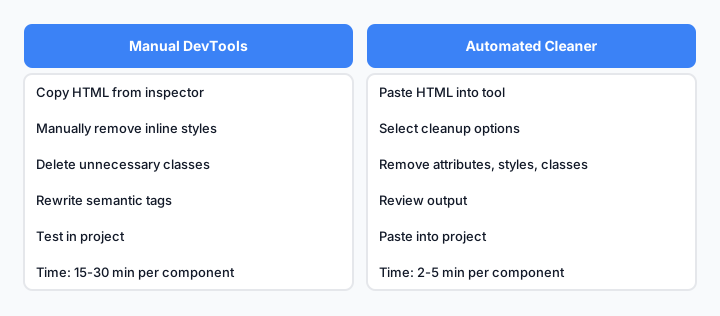
Comparison of manual DevTools extraction versus automated cleanup tools.
Manual cleanup gives you control but takes time. Automated cleaners can remove tag attributes, inline styles, classes, IDs, empty tags, and comments in one pass, which is faster but less precise.
The hybrid approach works best: use a tool to remove obvious bloat, then manually review the structure to ensure it's semantic.
Semantic HTML: The Foundation of Reusable Code
Semantic HTML is not optional. It's the difference between a snippet and a component.
Bad:
<div class="card">
  <div class="card-header">
    <div class="card-title">Title</div>
  </div>
  <div class="card-body">
    <p>Content</p>
  </div>
</div>
Good:
<article class="card">
  <header class="card-header">
    <h2 class="card-title">Title</h2>
  </header>
  <section class="card-body">
    <p>Content</p>
  </section>
</article>
The second version:
- Uses semantic tags (
<article>,<header>,<section>) - Is easier to style with CSS
- Works better with screen readers
- Is clearer to AI tools
- Becomes a real reusable component
Removing Bloat: Inline Styles, Classes, and Attributes
Inline Styles
Production websites often have inline styles for performance reasons. Remove them. Move them to a <style> block or external CSS.
Before:
<button style="background-color: #007bff; padding: 10px 20px; border: none; border-radius: 4px; cursor: pointer;">Click me</button>
After:
<button class="btn btn-primary">Click me</button>
Then define .btn and .btn-primary in your CSS.
Unnecessary Classes
HTML formatters can help identify and remove redundant classes, but you need to understand your framework first. If you're using Tailwind, keep utility classes. If you're building a component library, replace them with semantic class names.
Data Attributes
Keep data attributes only if they're functional (e.g., data-toggle, data-target for JavaScript). Remove tracking attributes like data-analytics-id unless you need them.
Testing Your Extracted HTML for Quality
Before you add extracted HTML to your component library, test it:
- Paste it into a blank HTML file with minimal CSS. Does it render correctly?
- Check for broken links or missing images.
- Validate the markup using the W3C validator.
- Test with a screen reader to ensure semantic structure works.
- Check in multiple browsers if it's a complex component.
If it passes these tests, it's production-ready.
Using Clean HTML with AI Coding Tools
This is where clean markup shines. When you paste clean HTML into Cursor or Claude, the AI can:
- Understand the structure immediately
- Generate accurate CSS without guessing
- Suggest improvements based on semantic meaning
- Generate variations or similar components faster
Messy HTML confuses AI tools. They'll spend tokens trying to parse it instead of helping you build.
Example workflow:
- Extract clean HTML from a SaaS navbar
- Paste into Claude with: "Generate Tailwind CSS for this navbar"
- Claude understands the structure and generates accurate styles
- You get a reusable component in minutes instead of hours
Building a Reusable Component Library from Clean Markup
Once you have clean HTML, you can build a real component library:
- Organize by type: buttons, cards, forms, navigation, modals
- Document the structure: what each class does, what's required
- Create variations: primary button, secondary button, disabled state
- Test combinations: do components work together?
- Version it: track changes as you refine
Pretty HTML tools can transform messy real-world documents into clean, readable HTML with a click, which is useful for bulk cleanup, but the real value comes from understanding why you're cleaning it.
A component library built from clean, extracted HTML becomes:
- Faster to build new features
- Easier to maintain
- Better for AI-assisted development
- Reusable across projects
Key Takeaways
Clean HTML structure is not a nice-to-have. It's the foundation of reusable components, better AI workflows, and maintainable code. When you copy HTML from a website, treat it as raw material. Extract it, remove bloat, apply semantic markup, and test it. The time you invest upfront saves hours later when you're building features or training AI tools on your codebase.
The fastest path: use a capture tool that separates HTML from styles, then clean manually or with an automated tool. The result is code you can actually reuse.